Off the Artboard #3 – Vault-Boy-Like Character Creation Part 1

OffTheArtBoard

This is a tutorial requested by my good friend and fellow Illustrator neophyte, Ron Peaks.  Looking to use a simple cartoon character for a manual similar to the cartoon Vault-Boy character from the Fallout series, yet still usable in a non-Bethesda-Obsidian publication.  It sounded like a good challenge so I took him up on it.

I have two warnings about this!  First, it’s a LOT longer than intended, because it has a lot of screenshots.  Second, this is just the way I figured out how to do it with my limited Illustrator knowledge.  I’m sure there are other, better ways, but if you want to learn how to make this kind of character with just basic tools this was the way that was most intuitive to me.  It uses just a few basic tools and is easy to color and personalize.

I’ve tried hard to not sound like Strong Bad trying to teach everyone to draw a dragon… (draw and “s”…then a more different “s”…)

This post will appear in two parts, this on shows how to make the character’s head.  One in a few weeks will show how to make his body.

An Illustrator Simpleton’s Guide to Making a Character that Resembles, Yet is Legally Distinct, from Fallout’s Vault-Boy:

 Step 1:

Create a perfect circle by selecting the ellipse tool, holding alt+shift and left click dragging it onto the page.

VB1

Step 2:

Add two anchor points using the add anchor point tool (it is in the same family as the pen tool left click and hold the pen tool and select it from the list that appears)  in between the left bottom and right top existing anchor points on the circle.  Click the “direct selection” tool, click each of the new anchor points you’ve just created (you may have to click them then click them again to ensure you’ve selected them).  Click and hold and drag them to a new location to warp the circle and make it appear a bit more square.
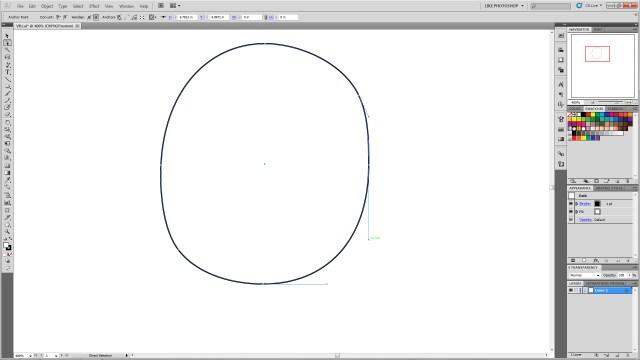
VB2

Step 3:

Create an oblong ellipse for the left eye.  Select it, ctrl+c to copy, ctrl+b to paste it behind the original eye.  (DO NOT click off of an object you’ve copied behind another object.  It will be extra steps and finagling to get it selectable again.  Any time you ctrl+c, ctrl+b in this tutorial DO NOT click anywhere else on the artboard, as it will deselect the new object and you’ll have to navigate to find it again.)   Then using the arrow keys nudge it to create the right eye.  While the right eye is selected shift+alt and resize and make it slightly smaller than the left (for perspective)

VB3

Step 4:

Select the star tool from the polygons.  Change it from 5 points to 3.  Click on the art board to create a triangle.

VB4

Step 5:

Rotate the triangle so the top point faces left.

VB5

Step 6:

Using the direct selection tool again, move the various specific anchor points to create the desired shape of the nose.
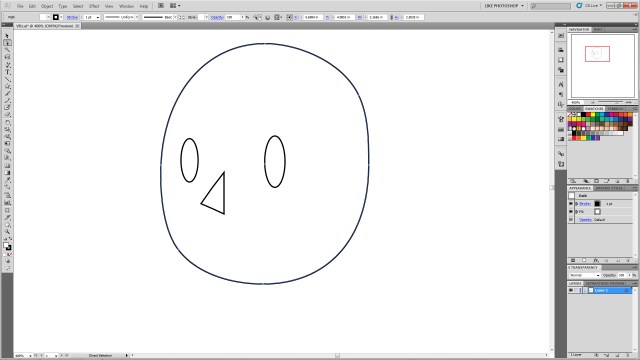
VB6

Step 7:

Using direct selection tool, select the central anchor point on the back of the nose.  Once it’s specifically selected hit delete to remove the line segment.

VB7

Step 8:

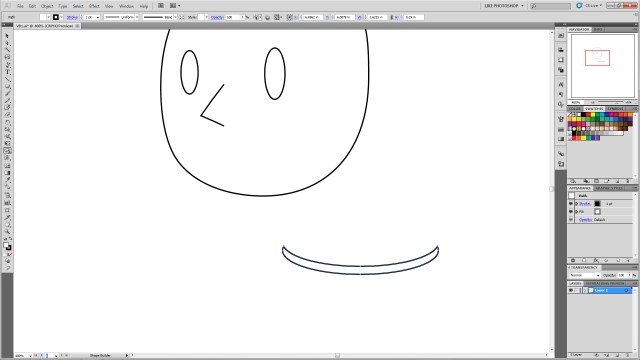
Using the ellipse tool create a wide oblong ellipse.  ctrl+c to copy it, ctrl+f to paste it forward and nudge it up.  This will be to create the smile, so feel free to move it to the desired position to make a bigger or different mouth.  You can also change the shape of the circle to make a bigger smile, a frown, or using different shapes and warps to make various expressions.
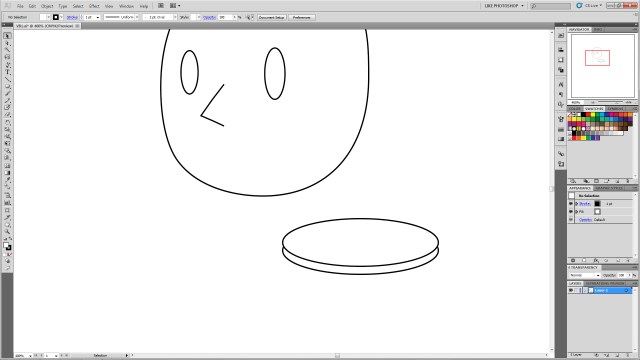
VB8

Step 9:

Select both circles.  Using the shape builder tool in CS5, hold alt and click and hold the top circle as shown.  Drag the curser through the top of the circles and release.  This will remove the unwanted shapes.
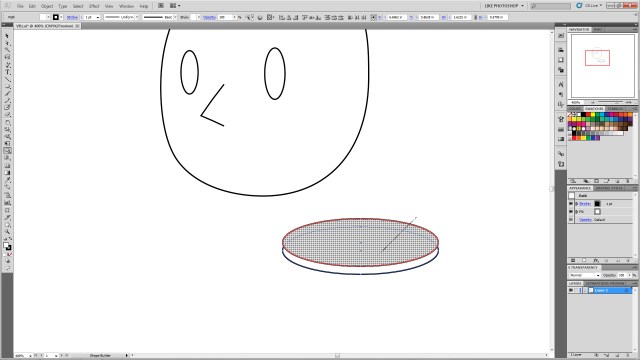
VB9

Step 10:

You’ll be left with just the desired “smile” shape.
VB10

Step 11:

Position the new “smile” in the desired place on the head.

VB11

Step 12:

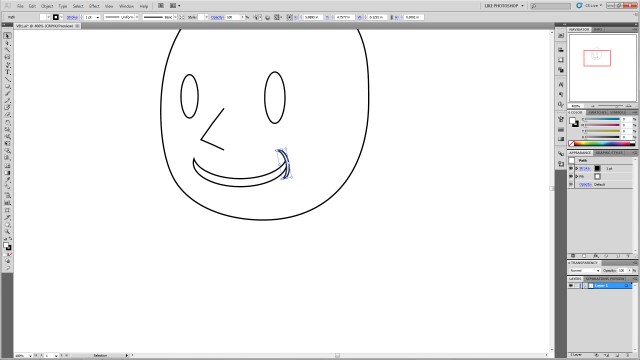
With the smile selected, ctrl+c to copy, ctrl+f to paste it in front of the smile.  Then, with the new shape selected, go to the menu, click Object–>Transform–>Rotate and type 90 into the box.  Then resize the item using shift+alt again to get it the appropriate size and move it to the corner of the mouth as shown.
VB12

Step 13:

Select the new mouth corner, ctrl+c to copy, ctrl+b to paste it behind.  Nudge it to the other side of the mouth.  Go to Object–>Transform–>Reflect and select vertical.  The select the main mouth shape again.  ctrl+c to copy, ctrl+b to paste behind.  Nudge it below the original mouth.  shift+alt resize it to make it smaller to create the line under the smile as shown.

VB13

Step 14:

Click the main smile shape again.  Ctrl+c and ctrl+f and move it above the eye.

VB14

Step 15:

From the menu select Object–>Transform–>Reflect and select horizontal to flip it.  Then shift+alt resize to get it the desired shape.  You can also select the object and free transform rotate it to get it the desired angle (you can make angry eyes, arched eye brows, etc.)

VB15

Step 16:

Select your new eyebrow.  Ctrl+c, ctrl+b and nudge it with the arrow keys over the right eye.  Go to Object–>Transform–>Reflect and select vertical to flip it and get it the correct angle.  Shift+alt resize it to make it a bit smaller for perspective.

VB16

Step 17:

Click the left eye (his left!)  Ctrl+c, ctrl+b, to paste the copy behind the original.  Nudge the new one up so it’s visible peeking out over the original eye and repeat the process for the other eye.

VB17

Step 18:

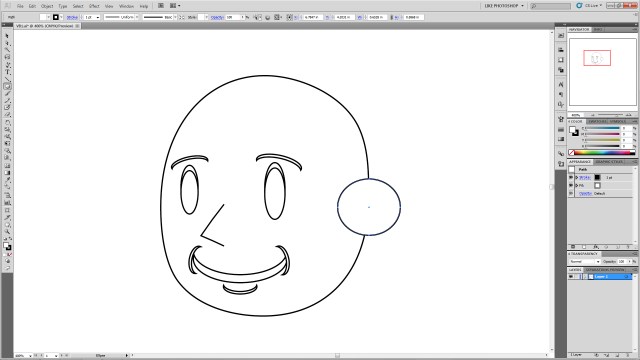
Using the ellipse tool, shift+alt to create a perfect circle on the side of the head.
VB18

Step 19:

Select the head shape and the new circle.  Using the shape builder tool, click inside the head shape, hold, and drag to the new circle to join the shapes as shown.

VB19

VB20

Step 20:

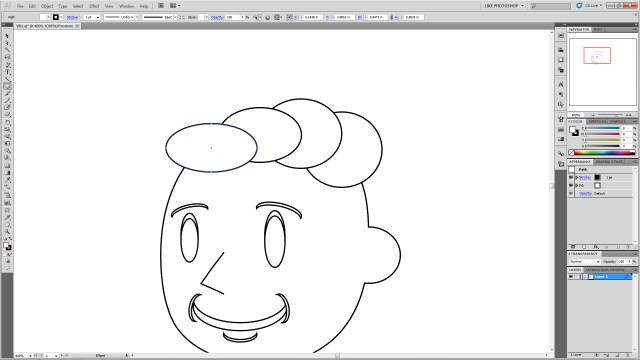
Using the ellipse tool create a series of circles on top of the head.  This will be for the hair so feel free to make an arrangement you like.  Just remember we’ll be joining these using shape builder, so it may take a few tries at this to ensure you get the desired final shape.
VB21

Step 21:

If you want the little swooshes as show, create two overlapping circles as shown, and select only those two.

VB22

Step 22:

Using shape builder, select the top circle, click hold+alt to delete the unwanted shape elements.

VB23

VB24

Step 23:

Drag the new crescent to the other circles, select ONLY the ellipses you created for the HAIR (Don’t select ANY of the other elements, especially the head shape.  This will mess up your art…) And join them using click+hold+drag over all the selected shapes.  You may have to do that several times inside the new “hair” shapes to join any extra shapes that might have been missed with the original join actions.

VB25

Step 24:

To add any extra “Swooshes” repeat process Step 21 as many times as you like and shape-builder them into the hair shape.  You can resize them and overlap them to make different shapes.  You can also resize the entire hair section.

VB26

VB27

VB28

VB29

VB30

Step 25:

Create a square using the rectangle tool in the location shown.

VB31

Step 26:

Using direct selection (again you may have to click each anchor point twice to make sure only the anchor is selected not the entire polygon) drag the points to the locations shown.
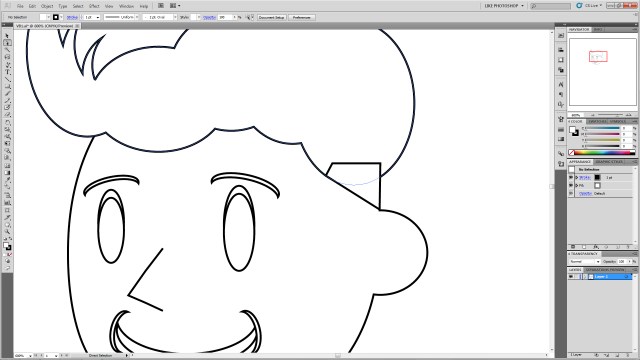
VB32

Step 27:

Select the “hair” shape and the newly-shaped polygon and join them using shape builder.  Feel free to resize or shape to create the look you’d like.

VB33

Step 28:

Create an ellipse in the location as shown and ctrl+left bracket ( [ ) key to send it to the back.

VB34

Step 29:

Selecting the new ellipse, Ctrl+c, ctrl+b to paste it and nudge it to the other side of the head.  You may wish to reposition it to give it the right angle.

VB35

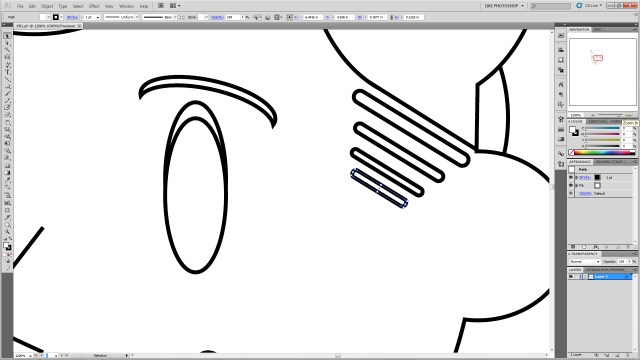
Step 30:

Create a rounded rectangle and free-transform resize it as shown.

VB36

Step 31:

Free transform rotate it so the angle matches the angle of the square you create for the hair.

VB37

Step 32:

Ctrl+c, ctrl+f to copy and paste it as many times as desired.  Shift+alt resize them to get them the correct size and move them into position as shown.  It may help to move them down and left or right with the arrow keys to keep them in line rather than moving them with the mouse.
VB38

Step 33:

Color your shapes as desired.  Select each shape and select a color from the swatches to give them the desired color!

VBColors

Step 34:

Create two overlapping white ellipses in the left (his left!) eye.

VB39

Step 35:

Selecting your new ellipses, ctrl+c, ctrl+b them then nudge them to the right (his right!) eye. Shift+alt resize them for perspective again.

VB40

There it is, you’ve created a legally-distinct Vault Boy-type character head!

As a bonus!

Want to give him a gruffer look?

Step1:

Overlap the face with another ellipse.
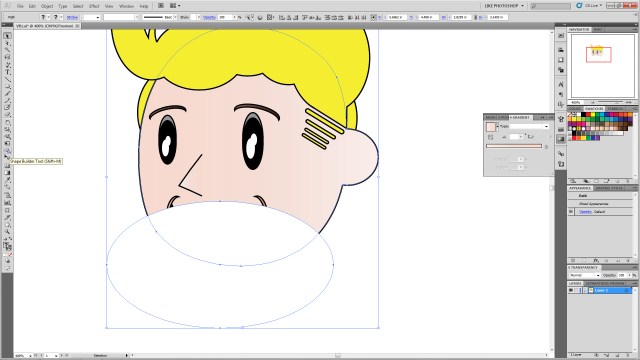
VBExtra1

Step 2:

Select the head shape and new ellipse shape and use the shape builder tool and click+alt to erase the outside ellipse shape.

VBExtra2

VBExtra3

Step 3:

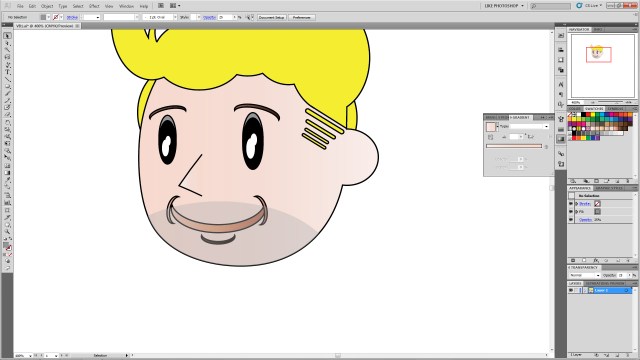
Recolor the ellipse any shade of gray, brown, etc.
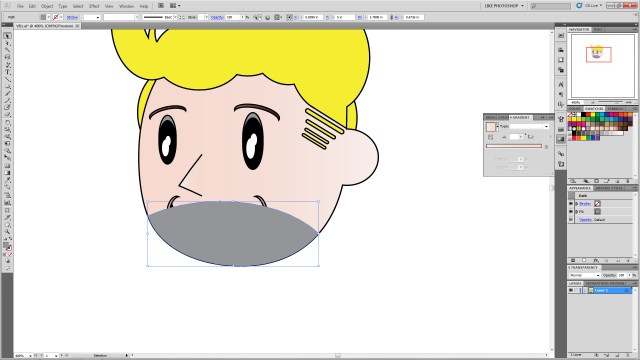
VBExtra4

Step 4:

Change the opacity to the desired shade to give him a 5 o’clock shadow look!
VBExtra5

Off the Top of My Head #7: The Thanksgiving Bird is the Word

Off The Top of My Head

Last Thursday was Thanksgiving.  That usually means family, food, and time off work.  And typically when people say “the bird is great!” they’re referring to a roasted turkey they’re eagerly devouring along with various vegetables, pies, rolls, and sauces.  It’s as often as not a bald-faced lie too as, it turns out, turkey is apparently rather difficult to cook to perfection.  My dad usually has a good-turkey trick, but I’ve heard not everyone has as fool-proof a poultry plan.

This year, however, when I think of the “bird” from my 2012 Thanksgiving, I’ll think of THIS:

Hawk

After our Thanksgiving food-fest, I went to a store for a major caffeine hit, and when I returned this guy was waiting at the house.  He swooped down in most magnificent fashion, then performed daring, aggressive leaps at a small bush at the terrified little birds hiding within (he didn’t get any of those).

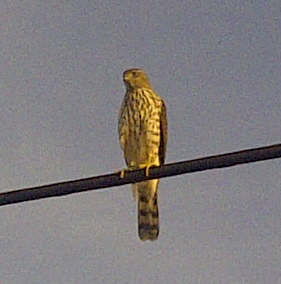
He then flew to a nearby powerline (where he imposingly glared down at me) …

Hawk
I took this pic and the above pic with my phone…which is why it’s as grainy as it is. Don’t believe the hype…phones aren’t cameras…

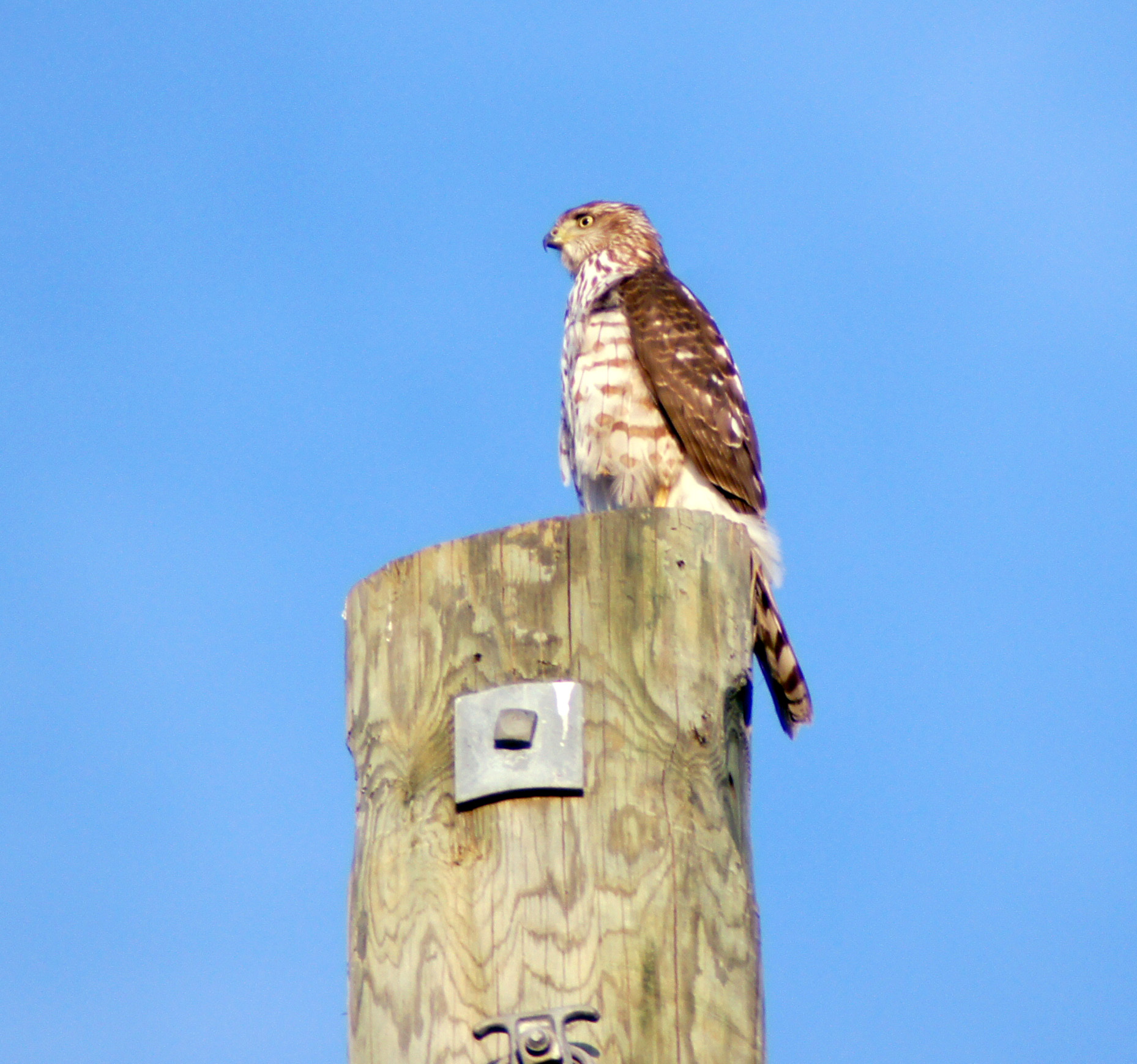
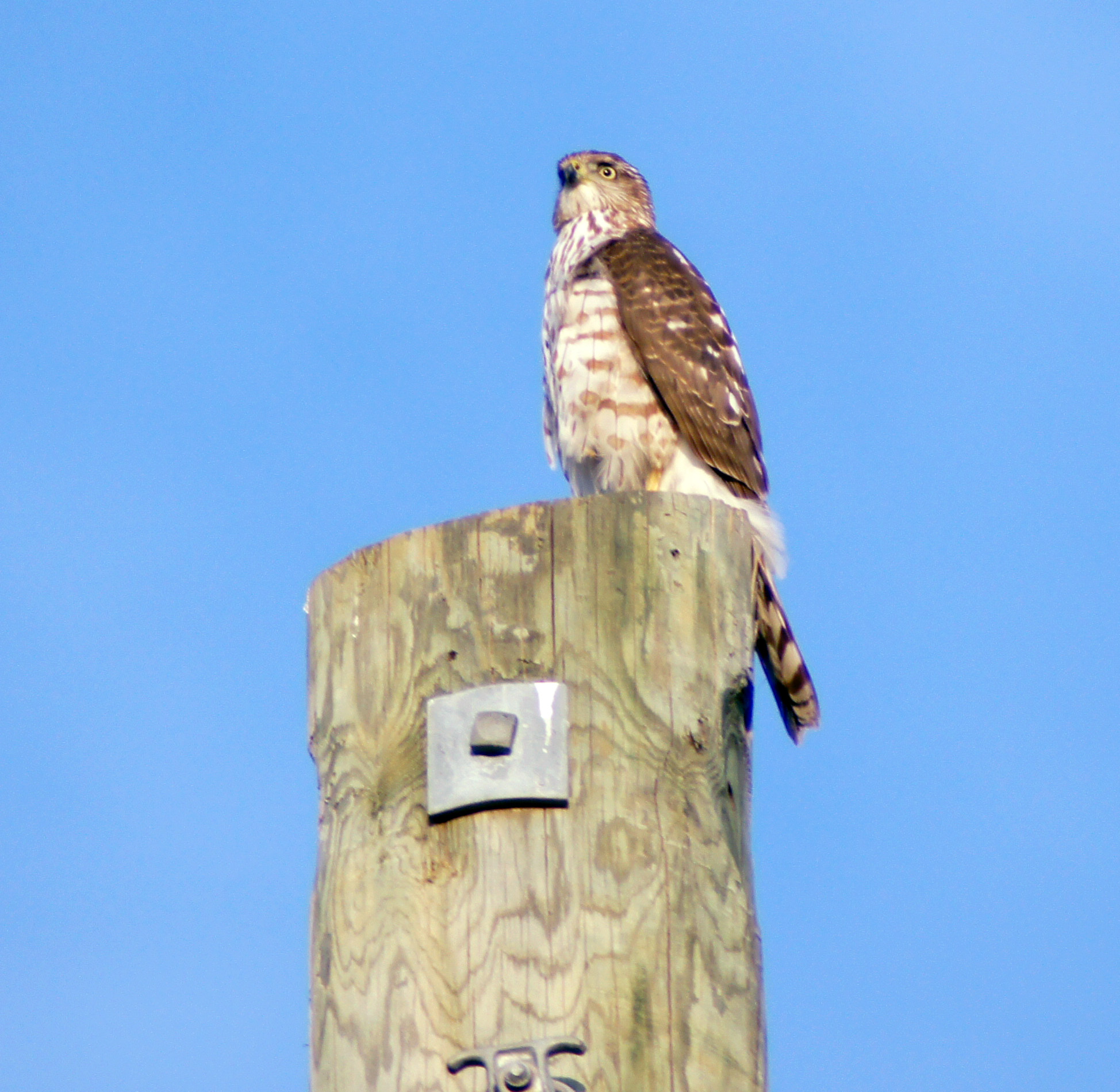
…and then to a pole where he regally surveyed the surrounding terrain for more accessible prey.  He stayed there long enough for me to run inside, grab my a55, and run back outside telephoto lens attached.  I was in such a rush I didn’t have time for the tripod set up.  Fortunately he lingered long enough for hi-drive speed to net me some good pictures!

Hawk HD

Hawk

I was able to get over 150 photos of him perched up there before he locked eyes on something a hundred or so yards away and again dove impressively out of site to either another near miss or on top of a less-fortunate small animal than the birds hiding in the lucky shrub.

I learned a few things from this:

1.) There’s something unique about seeing a natural predator like this in the suburbs.

2.) Birds of prey are fearless and seem naturally pretentious, the whole time he looked at me it was as if he was thinking, “Look at that clumsy mammal down there staggering around me for no reason…”

3.) No matter how old you are if you see such a thing in action the only thing you say is, “Wooooow…”

I think he was a juvenile Cooper’s Hawk, but can’t say for sure.

Seeing him definitely changed my definition of the Thanksgiving “bird” for a while!

To see more on strange avian holiday visitors see Story of the Month for November written by my lovely RevPub counterpart!

Next week will be a requested Illustrator tutorial, and the following week a return to Life-Lessons from Video Games!

Off the Top of My Head #6: Gangnam Style

Off The Top of My Head

I’m the last person in the world who gets into latest trends.  I’ve essentially been the same since about 1996 in terms of style, musical tastes, and interests.  That being said some fads are catchy.
I came late to the “Gangnam Style” craze.  It kept showing up in parodies, videos, and feeds on all my frequently visited sites and I was curious.  Needless to say it was pretty confusing and all the typical questions popped into my head such as, “What the-?” “Huh?” and “Why-?”  But when I saw the real video it all became clear.  It’s a hilarious track, the video is full of pop-satire, and, of course, it’s extremely catchy.

So when I went to the wedding of some friends and Gangnam Style came on it was hard not to do the dance, even if it was just on the sidelines.  The groom cut loose on the dance floor, and when my date to the wedding, the fairer half of RevPub, shoved me out on the dance floor I had two choices:

1.) I could slink back into the shadows and appear as a “punk” in the eyes of all in attendance.

or

2.) I could do my best to NOT be out-danced in public!

I went with the latter.  And the impromptu routine the groom and I concocted on the spot got lots of praise from everyone present!

Here’s a video taken at the event:

More than anything it was a LOT of fun, and goes to show, trends may seem a little silly, but if you can’t beat ’em…join ’em.  You might just have good time.

Horror Movies and Real Life

We’ve all seen Scream and hopefully everyone has read “15 Signs of a Horror Movie Fan” written by the fairer half of RevPub.  We all know the rules for surviving a horror movie and have all had those, “I’d never do THAT if I was in that situation” moments watching a slasher film.

I’ve been in a few moments that made me think maybe I was that idiot character dropping the weapon and turning my back instead of pummeling my momentarily weakened pursuer into sausage filler.  I’ve tempted fate by saying, “What’s the worst that could happen?” and I’ve been with a friend exploring the supposedly haunted second floor of my office when she yelled out “HELLO?!” and I responded, “Are you crazy?! Have you seen ANY horror movie ever?!”  But there was one incident where I really failed the “How to Survive a Horror Movie” test.

I was dog-sitting for a co-worker in his home in a rural area.  I went early in the morning and early in the evening to ensure he got his food at regular intervals and got to go on regularly timed run-arounds and walks.  I let him out the back door when I noticed a deep gouge in the grass.  Almost like something huge, heavy, and long had sat there for a long time.  I leaned down, with the dog still on the leash, and saw the depression in the grass was about 10 inches wide and stretched from the back door all the way to the side of the house, around the corner and out of sight; probably some 20-30 feet in full length.  I took two slow steps and reached down to find long strands of shed snake skin strewn about within the trench.

Not thinking, I tugged the leash and said, “C’mon, boy let’s see where this leads” and started around the corner following what could only be described as the path of a MASSIVE snake.  As I pulled the leash the dog whined slightly and reluctantly followed.  I said, “C’mon…!” and dragged him along the giant snake path.  As we rounded the corner and I brushed leaf-heavy branches out of my view I said to myself, “What are you doing…  You’ve just become the idiot in a pre-title sequence to an AWFUL horror movie…”  Realizing my stupidity I turned around, took the dog on his walk around his regular path and took him back inside.

In retrospect it was likely the place where one of those large, black, plastic drainage tubes laid and the snake skin was just there by chance.

The Horror Movie expert in me, however, feels I narrowly survived being eaten by a massive super-python that night.  And only the dog was smart enough to try to avoid it.

Have you ever been in a horror movie-type situation?  Did you act as you always thought you would, or did you become a bad Friday 13th stereotype like I did on this one occasion?

If you answered the latter, don’t worry; even if it did briefly seem like you were about to become a slasher film statistic remember that someone has to survive long enough to frustrate and beat the bad guy right?  Just because you made a mistake 20 minutes after the title card, doesn’t mean you won’t survive to see the franchise psycho off for this particular installment!  Let’s just hope we all survive the first 15 minutes of the sequel!

Someone does have to be that “final girl” (I’m looking at you Raven) I just hope I’m there for the credit crawl…

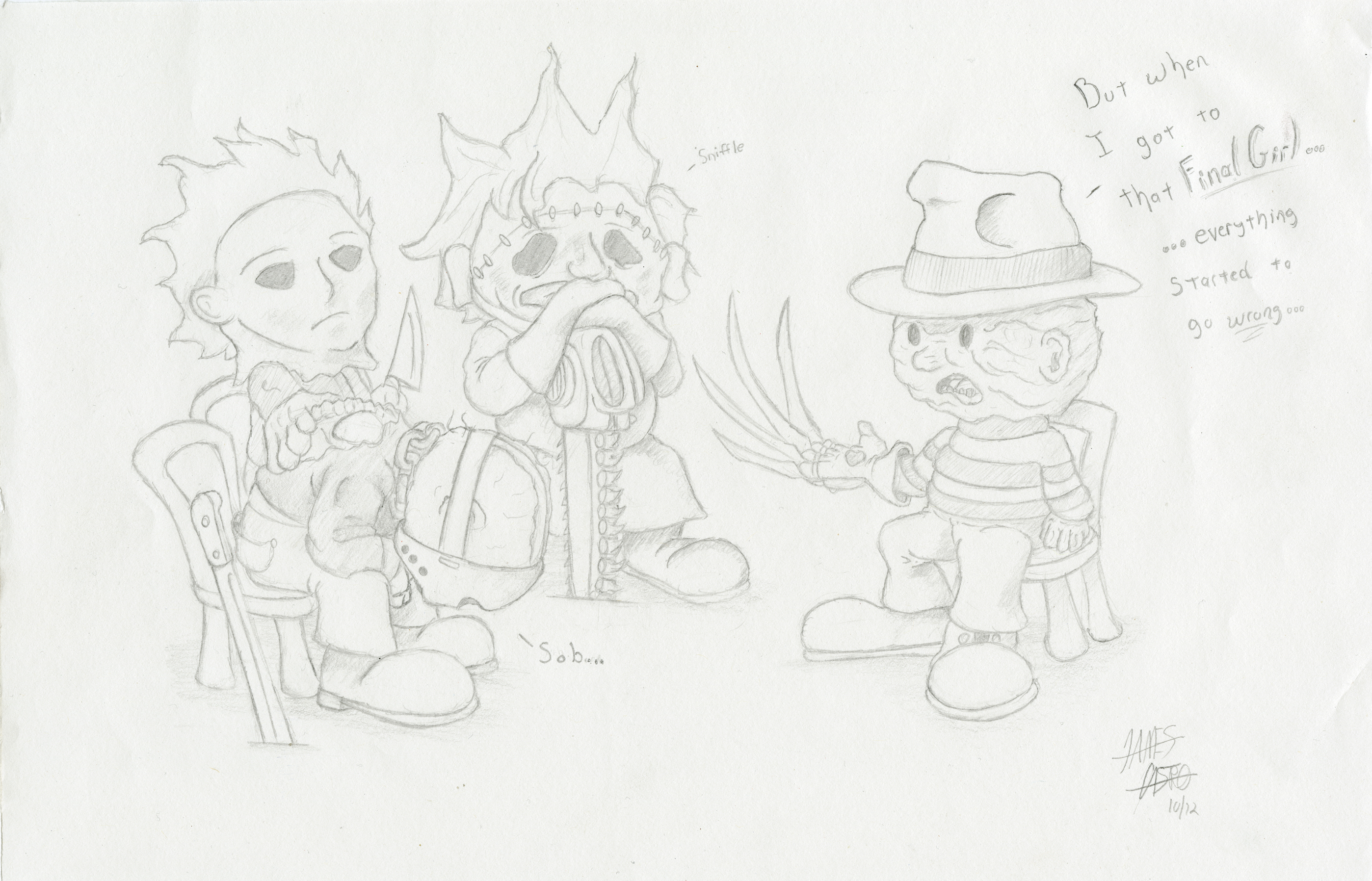
Monster Therapy
Because maybe they can only truly understand each other…

Ghost Story #1: Lurking Around College

My belief in ghosts is complicated.  My logical side can’t quite grasp why the spirit of a deceased life would linger around here and creep people out or repeatedly do the same tasks over and over.  On the other hand, my willingness to accept that we know very little about the natural world causes me to believe that all that energy a life possesses must go somewhere, so why not retain a consciousness as a “ghost” or something we don’t fully understand?  At the same time I think if my energy, consciousness, or spirit lingered around after I died and could interact with people and my environment I would ABSOLUTELY creep people out, so that’s a double tick next to the “maybe there are ghosts” column.

Even my logical side struggles with some of what I experience and this month, as the far more fetching half of RevPub stated in her last post, I thought I would share some of my more unexplainable experiences.  Starting with one from college.

I lived in an internal, single dorm in college.  Roommate life was definitely not for me so sophomore-senior years I lived in a dorm where I had a room to myself.  Unlike the 1960s-style hotel dorms on campus where all the rooms opened to the outside, this building was a brick structure with offices on the first floor, a keypad (with a 4-digit number to unlock it) that opened to the second floor where all the dorm rooms were.

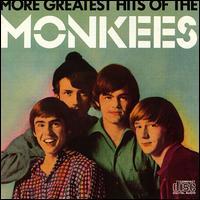
One night I was carrying groceries in several bags.  I shifted bags when I got to the locked door to the dorms, so I was holding them all in one hand so I could input the unlock code into the number pad.  I glanced over my shoulder and saw another guy behind me.  He had an annoying, hipster-ish Hey, Hey we’re the Monkees Mickey Dolenz haircut and wore a retro orangey striped shirt.

The Monkees
That’s him second from the right. Hair just like that!
Shirt
Not exactly like this but close. It was more like this without the broad yellow bands, just rows and rows of the narrower stripes.

I input the correct number and gently, but firmly, kicked the door open.  I nudged it open with my elbow enough to let the dude behind me get in too.  I hadn’t seen him before and didn’t get a good look at him.  Technically I wasn’t supposed to let a stranger in, but rather than be a jerk I thought I’d just let him tailgate through the door and not have to go through the trouble of entering the entrance number.  I got a little annoyed by how close this guy was behind me up the stairs (which curved twice and had one landing), and I glanced at him again over my shoulder with kind of a “want to give me some space?” look as I heard the door close downstairs.  My room was RIGHT next to the top of the stairs, and as I approached my door and put my bags down, I glanced back at him again and he was gone…  I calmly held my keys quiet and walked to the stairs, looking over the rail and listening for footsteps.  No one was on the stairs.  No one opened the door downstairs.  No one went down the hallway.  My logical side took over and said, “maybe I just missed him…maybe he went back down as soon as I reached my door…maybe I even imagined him.”  But I knew he was there.  I saw him.  Got annoyed at him.  Remembered what he was wearing and how he looked…  And more than anything there was a feeling that someone WAS there and something wasn’t right about the way they just weren’t there anymore…  To this day I can’t say for sure, “I saw a ghost!” but that was a little unusual…

Stay tuned for more personal supernatural stories from both RevPub authors during the whole month of October, leading up to our favorite holiday!  Halloween is the most wonderful time of the year, the only day I can legitimately dress like a killer, monster, or zombie and everyone thinks it’s fun.

Off the Top of My Head #5: Winning Hearts and Minds with Goldie the Black and Yellow Garden Spider

Off The Top of My Head

 I once had a serious brown recluse infestation.  A flat, cardboard glue trap designed to ensure that our cat, Sweetie, had beaten her flea problem, caught one giant brown recluse.  Afterward more traps caught dozens, sometimes HUNDREDS more, of all sizes all over the room.  Needless to say it caused nightmares and paranoia, but, believe it or not, after a while I got used to them.  I’d sit in the floor, playing guitar or drawing, and see one creep by.  I’d smash the life out of it, and then go right back to business as usual.  I have since traded my brown recluse infestation with a cellar spider infestation.  They EAT brown recluses but are harmless to people so I say it’s a fair, natural, “circle of life” kind of trade.

Spiders creep people out.  Often the reasons for this are “they have too many legs,” or “too many eyes,” or “they’re dangerous.”  Mostly I think it’s because they’re an unseen threat, we usually only notice them if something is wrong, like we’re bitten or we see them in an unusual are like a bedroom or kitchen.  I think of it this way: I had hundreds of brown recluses stuck to glue traps.  I only ever saw 20 or so running loose alive.  As far as I know I was never bitten and who knows how many were actually roaming around that I DIDN’T see and weren’t in the traps.  So maybe my infestation was good for me, it got me accustomed to them and taught me a bit about fear.

It gave me a new spider policy: I bring them no harm, no matter how dangerous they may be, so long as they’re outside.  I’ve even released a brown recluse that a friend asked me to identify, she brought him to me in a cup  and I felt if I killed her it would feel like executing a prisoner of war…somehow just wrong…  If they are inside I typically bring them no harm if they are harmless.  Woe to the poor brown recluse that staggers through my defenses into my room now though…dangerous ones in my space I treat like invaders…

But most people hate spiders, even those outside.  During my vacation the first week of August I left my home and came across her:

Yellow and Black Spider

She built her web at the end of our carport and I immediately recognized her as a gold and black, or yellow and black, garden spider.  I knew she was harmless and her web was so impressive I implored everyone in the house to let her be.  Everyone wholeheartedly agreed and, despite the fact that she was initially considered creepy by some, she has grown on us.  She was named “Goldie” and we put up a sign to warn package delivery services to not destroy her web or bring her any harm.

Goldie
Goldie the female Yellow and Black Spider.

Every morning we check her web, see if she’s caught any food (it’s usually in tatters from the moths and other insects she’s skewered) and every now and then she’s draining some poor meal (I still feel for the eaten bugs…what a way to go..)

Goldie Snack
That was a WASP. She had quite a meal there…

Goldie has become kind of an outside pet.  We are pleased to see she’s eating well (I’ve tried to offer up some superworms which unfortunately flew straight through her web), we cheered when she built not one but TWO massive egg sacs, but we lament that, despite the safety of her location from birds, she will not likely find a mate in the carport…

Egg Sac
Goldie’s first egg sac
Egg Sac
Goldie’s second egg sac

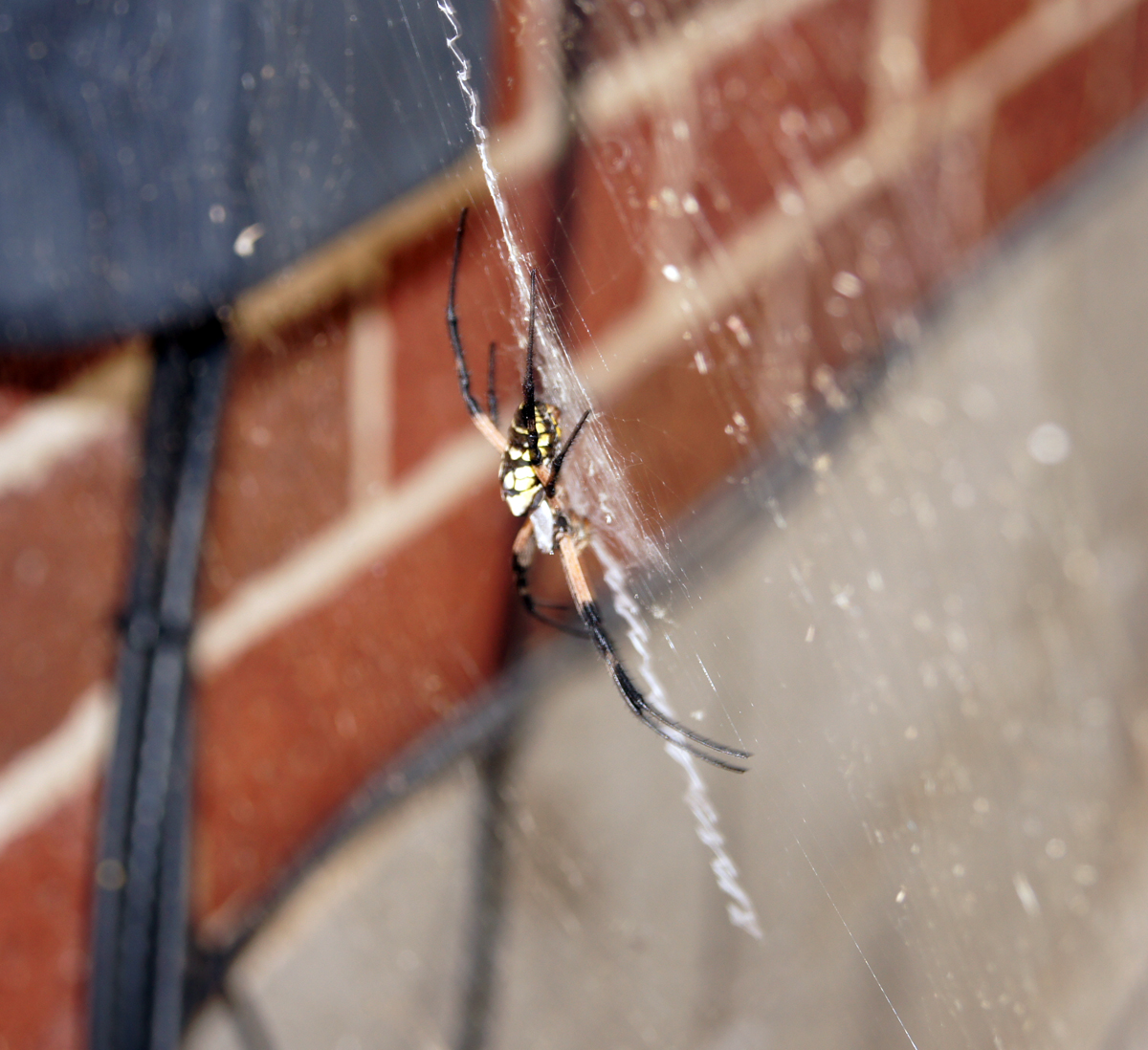
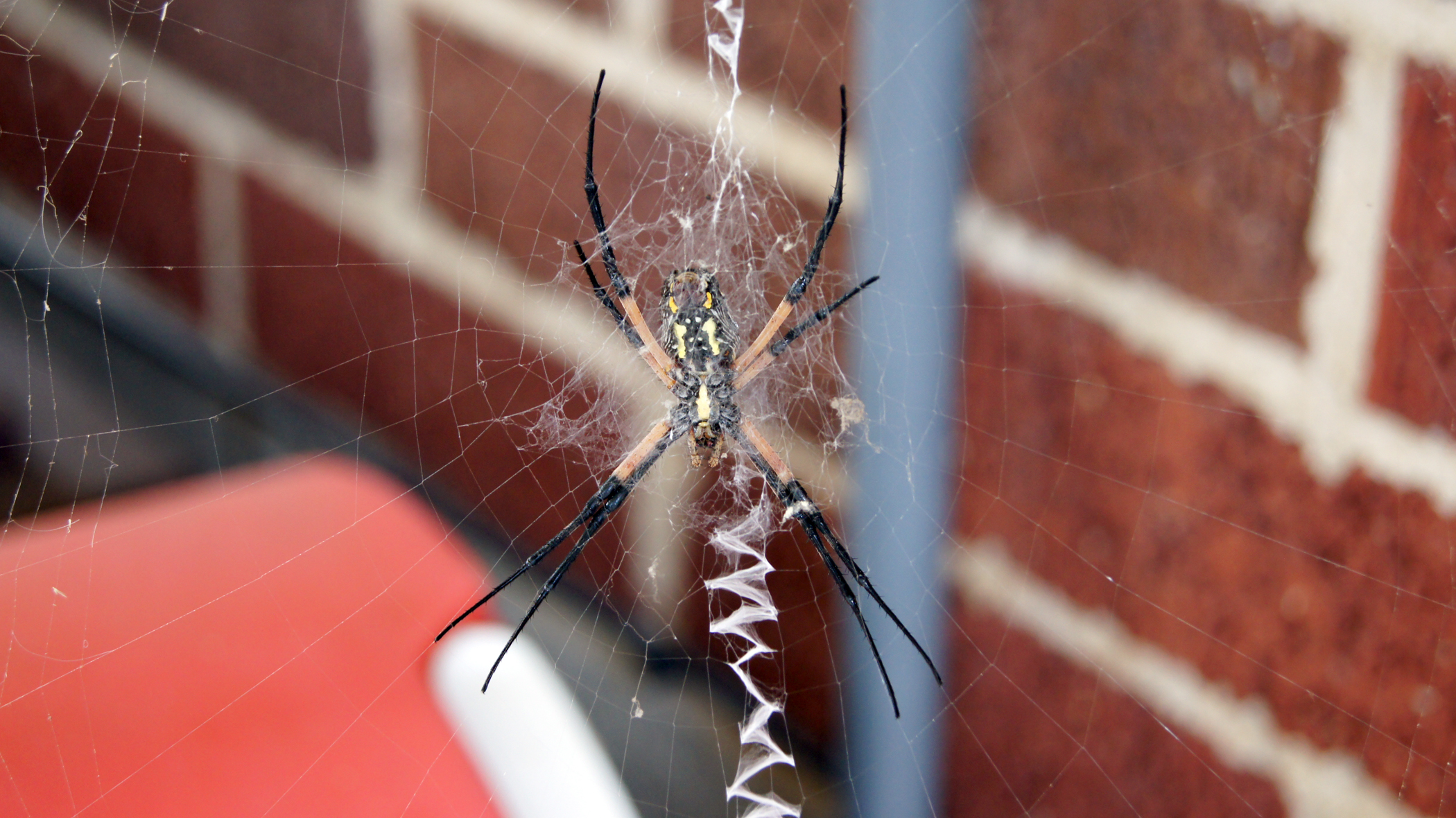
Goldie the spider changed the hearts and minds of many around here who feared or disliked spiders.  The fear of spiders is largely irrational; as are most fears.  Remember a world without spiders is a world full of cockroaches, moths, and flies!  And I for one am much happier with these lovely little killers out there.

Goldie Side

Goldie Under

Here’s a video of Goldie spinning her web.  Forgive the raw version of it I took it in a rush THIS morning and haven’t had time to edit it yet.  I had never before seen her doing this and was pretty excited to get it on video at all!