Writing for Web – Chapter 2: Sound Like You, Only Better – Part Two

We took a break last week, so thanks to everyone who commented and read my first movie review. Sometimes inspiration just hits you, and you have to run with it.

This week, let’s wrap up Chapter 2. The rest of this chapter is about organizing information for your audience. Many of us are aware that our attention spans are shorter, and the world moves much faster than it used to. We want information in chunklets, and we want to be able to scan without reading. Although, I’m a little sad that every precious word isn’t read, I get it. I do the same thing.

To practice what I’ve read, here are the most effective ways to write content for your audience:

  • Keep thoughts and sentences short for reader’s attention span.
  • Write a strong lead.
  • Avoid semicolons and multiple commas because they are hard to see on screen.
  • Use bullets and lists to organize info.

Felder focuses this week’s exercises on attention to detail and brevity. These assignments were especially challenging because it’s difficult to be detailed and brief. The one below was my favorite, and I used one of my favorite books – Harry Potter and the Half-Blood Prince – instead of an author. I admit, it’s pretty cool to work with Harry Potter.

The assignment:

Find a sentence by your favorite author. Every writer can improve. Take that sentence and revise it so it follows the best practices from the Web.

125 words – J.K. Rowling, Harry Potter and the Half-Blood Prince

This was pure imagination, however, as he had had no opportunity to tell Hermione what he had overheard. She had disappeared from Slughorn’s party before he returned to it, or so he had been informed be an irate McLaggen, and she had already gone to bed by the time he returned to the common room. As he and Ron had left for the Burrow early the next day, he had barely had time to wish her a happy Christmas and to tell her that he had some very important news when they got back from the holidays. He was not entirely sure that she had heard him though; Ron and Lavender had been saying a thoroughly nonverbal goodbye just behind him at the same time.

98 words – R. Petty, Writing for Web

Harry couldn’t find Hermoine to tell her what he had overheard. An irate McLaggen explained she left the party early, and she was in bed by the time Harry returned to the common room. The next day as he and Ron left for the Burrow, she rushed out so quickly he barely had time to wish her a Happy Christmas. He tried to explain that he needed to see her after the holidays, but he was not sure she heard him. Ron and Lavender had been saying a thoroughly nonverbal goodbye just behind him at the same time.

There are several differences in the above examples. I think Rowling’s is written well, however I learned she uses the word ‘had’ too much. I left the last sentence as is because I liked the way she words it. It could be shorter and more direct for Web, but it wouldn’t be as subtle or fun. I did get rid of the semicolon, so I followed one rule. As you can see, by writing for Web I managed to cut 27 words from the paragraph. I’m curious if it made a difference.

So, here’s my question for you: Did you read each word, or have you skimmed this entire post? What keeps your attention? Leave replies below!

An Illustrator’s Foray into Adobe Illustrator – Week 4

Shapes can show emotions too.  Really.

Seeing shapes is how illustration begins, especially in Illustrator, but using shapes to create something with personality is a different level.  I could gladly live in a world of inanimate sharpened objects and smooth, perfect polygons all day (they are rarely annoying and frequently useful) however living such a life, even in artwork, would be kind of a drag.  So I sought ways to turn shapes into characters.  In doing so I stumbled across this site, which has been a wonderful resource of Illustrator tutorials:

http://vectips.com/

Not all of them are perfect and some of the instructions can be a little vague, especially if you like to go through tutorials in a “I get the gist” kind of way and skip ahead…you’ll be doing a LOT of ctrl+z…read all the steps…seriously…

This tutorial was by far my favorite on the site as it had the most to do with my kind of illustration and it allowed some real creativity to burst forth:

http://vectips.com/tutorials/create-a-happy-sun-character/

This is a little surprising given my penchant for the macabre but seeing all of the steps needed to create this character; all of the tools used; the various effects, gradients, and polygons combined and altered to turn simple shapes into an expressive character was truly entertaining.  It also allowed for a significant amount of learning-while-doing that sticks with me because of the fun I had making the lil sun guy.  Here’s my result of the tutorial:

I love this guy. From his dilated eyes to his gap-tooth smile. Just love him. Don’t know why.

And because I’d rather be howling at the moon that funning in the sun I created this original piece using the steps and tools in the tutorial:

I hate to be overly proud of myself (not really) but I was really fond of how this moon came out. I like him even more than the sun.

Hopefully all of these sphere tutorials have been as enlightening for other Illustrator neophytes as they were for me.  Next week will be one last shape tutorial I found that includes shapes and textures used to make a dramatic and slick-looking graphic…even if it’s not as personable as a happy sun character it’ll be something to look forward to!

As Good As It Gets – 15 years old, but not forgotten

This week I caught one of my favorite movies, As Good As It Gets. For those who haven’t seen it, Melvin Udall (Jack Nicholson) is an obsessive-compulsive romance novelist. Melvin falls in love with the blunt, struggling single mother Carol Connelly (Helen Hunt) and befriends his homosexual artist neighbor Simon Bishop (Greg Kinnear).

This movie came out when I was 15 years old. I remember seeing it for the first time when I was 17, and I watched it on TV and later bought a copy on VHS. For some reason, this movie captured my heart when I was a teenager.

After rewatching it, I see why. This movie is packed with well-written one liners, an interesting (and believable) plot about acceptance and coping, and above all, it shows you can find happiness in the darkest times. For a moment, let’s to look beyond the basics of traditional romantic dramadies and see why this is a timeless must see.

The characters: Melvin is as obsessive compulsive as a guy can get. He separates his Skittles, doesn’t like animals, brings his own silverware to restaurants, won’t walk on cracks, etc. When he speaks, there is no filter. He frequently pisses people off and can make almost any social situation awkward. His character is refreshing, and everyone has a little Melvin in him/her. We are who we are, and the rest of the world either accepts us or they don’t. It’s not always easy, but it’s that simple.

It makes you think: The movie focuses on looking past ourselves and our problems to focus on someone else. All three major characters are significantly different and are forced to mesh together and coexist. It’s a great example of tolerance and acceptance, which we can all practice more. We can all care a little more and do something do help someone we know – even if it’s just to make them smile.

Realism: As Good As It Gets is exactly what the title states. It doesn’t play games or try to sugarcoat how awful things can be, and it shows how having the power of optimism can make things better. You can improve your life by either changing what you don’t like or accepting and letting go what you cannot change. Sometimes things are as good as they get.

Clever writing: This movie is full of one liners and great dialogue, which I admittedly appreciate more with age. When it comes to sappy romantic movies, Jerry Maguire‘s, “You complete me,” line is often thought of. Well, here are two for you: “You make me want to be a better man,” and “You’re the reason cavemen painted on walls.” Tom Cruise, eat your heart out.

If you haven’t seen it or haven’t seen it in awhile, you should. It’s a great flick and a reminder that we can be better people.

An Illustrator’s Foray into Adobe Illustrator – Week 3

More spheres!  Admittedly working all of these tutorials was pretty addictive and once I started learning how to use Illustrator’s various functions it was hard to stop seeking out new applications to learn.

After designing the previous sphere, which was of course simply a circle shaded to resemble a 3D object, I became curious about the rendering capabilities of Illustrator.  While cruising the forums the rendering features are often discussed and, much like pathfinder tools, which can be a little confusing for beginners like me, the 3D rendering feature feels inaccessible.

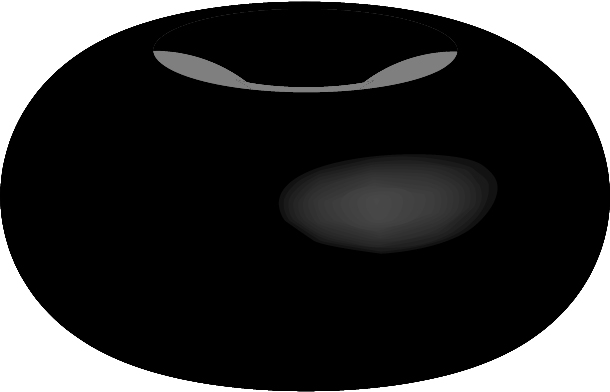
My first attempt to create something in 3D without instructions was a sphere, what could be simpler than a circle, right?  So I created an ellipse and tried a few of the 3D options, creating a cylinder, a disc, and finally this thing:

The Great Black Oil Donut

I clearly needed some assistance with this feature and while searching for “How to Create Spheres” I found another tutorial that showed, as an element of the exercise, how to create 3D spheres.  Once you see how it’s done it feels a little less psychotic than all the random shapes you can create just trying to make a polygon a 3D polygon.  The tutorial taught how to make a “peel effect” which is similar to the AT&T logo of a shape wrapped around an invisible sphere.

The tutorial:

http://www.tutorialsbucket.com/peel-effect-in-adobe-illustrator-cs5

Not only does this teach how to make 3D spheres using the rendering tools, but how to repeat graphic shapes using transform, how to create symbols, and of course how to apply the symbols to make the peel effect.

During one of the steps it shows how to easily create a 3D rendered sphere like this:

Sphere!
My first sphere rendered in 3D.

It was one of my favorite basic illustrator tutorials.  It was very easy to follow and provided clear steps in the multiple tools used to create the graphic.  Also it teaches by osmosis several other useful tools and finally hammered into my analog brain how digital 3D rendering works. I used it to create the peel effect he shows:

I admit when it worked I did say aloud, “What the…that actually worked!”

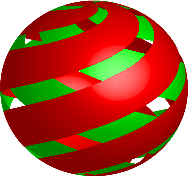
One slightly more difficult one of my own:

It was just an attempt to apply the rectangles in an overlapping fashion but it came out looking a bit like a Christmas tree ornament. It let me try the process one more time though!

And then combined it with what I learned in the previous tutorials to create this original graphic inspired by the wonderful, colorful, world of James Rolfe’s AVGN:

Yes, ladies and gentlemen, it is…an F-Bomb… And I think the Nerd would approve since it looks like a Nintendo 64 graphic.

The above graphic was created using the 3D rendering sphere technique learned in the tutorial from this week; the cylinders I created by accident using “bevel and extrude” trying to create spheres before I learned how to do it properly; radial gradient shading learned from last week’s tutorial; and the pen tool (which I accidentally left on the gradient fill and made a nice fire effect).  It goes to show, once you learn enough to operate properly, classic trial-and-error methodology still has skills it can impart…and that feels like a Mr. Miyagi-level lesson.

Next week is the last tutorial about making spheres and how they’re used to create textures and even characters.  I’m sure there are plenty of other ways to use the 3D rendering tool so feel free to share creative ways to use them.  To quote Bender Bending Rrrrrodriguez: Learning is fun.

The inspiration for the F-Bomb:

Support James Rolfe and the AVGN Movie at Cinemassacre.com!

Writing for Web – Chapter 2: Sound Like You, Only Better – Part One

Chapter 2 catered to the grammar geek in me. I sometimes hear people say spelling and good grammar don’t matter anymore. With the world of short handing for texts and readers skimming everything, why do I find spelling and grammar important? For preservation. Imagine a world where we answered by saying l.o.l. instead of laughing, or instead of the special “I love you” you heard I less than three you. It’s just not the same.

Felder states in her Best Practices for Web chapter that you should sound like you, only better. Writers know their voice and tone, and new writers may not have found it yet. Felder helps you observe others and your own style, so you can hear your voice and improve it. See below for an exercise that I urge all writers to do; it only takes a few minutes.

Assignment 2: Get a story or article you wrote, and mark all the ‘to be’ verbs. Get rid of them, and edit the phrases or rewrite the sentences.

Verbs to mark: to be, am, is, are, was, were, being, been, be

Examples from my article about Arts and Entertainment in East Mississippi:

Before

Meridian Little Theater is far from small in the hearts of Mississippians. This theater dates from 1932 and seats 400 attendees. This venue has grown to be the largest community theater in the state. With the help of nearly 1,000 volunteers, MLT is able to produce more than 50 performances a year.

After

The Meridian Little Theatre holds a big place in the hearts of Mississippians. This theater dates from 1932 and seats 400 attendees. As the largest community theater in the state, and with the help of nearly 1,000 volunteers, MLT produces more than 50 performances a year.

Before

The Meridian Museum of Art is located in the city’s only remaining Carnegie Library. Built in 1912-1913, the museum houses all that is art in the area. Along with supporting regional artists with exhibits and groups, the museum offers art education and outreach to the community.

After

The Meridian Museum of Art houses art in the area. Built in 1912-1913, the museum resides in Meridian’s only remaining Carnegie Library. Along with supporting regional artists with exhibits and groups, the museum offers art education and outreach to the community.

As you can see, the assignment truly made a difference. The writing becomes clearer, and overall I managed to cut about 40 words from this article.

Also in chapter 2, Felder gives you various tips on writing about writing succinctly, using conversational tone, and what to avoid such as idioms and trendy phrases. She also reworks the famous, “show, don’t tell” advice by insisting we do both – we show and tell.

I found these tips useful and will implement them immediately. For fun, see if you can find a ‘to be’ verb in my review, and feel free share your editing tips below.

For extra fun: This week my co-author recommended this inspirational video — creative types will enjoy this pick. http://www.youtube.com/watch?v=4Kc3JqVIIJA

An Illustrator’s Foray into Adobe Illustrator – Week 2

Anyone who has done any graphic work, from MS Paint to Photoshop, seeks a way to make a 2D object look 3D.  In fact, even with pencil and paper the goal is an illusion of three dimensions using perspective and shadow.  I understand how to do that on paper.  It took some time to figure it out in Photoshop … and more online tutorials to sort out the details in Illustrator.

Some objects are relatively easy to 3D-up … as we learned from elementary school, anyone can draw the transparent cube … but spheres are different.  An imprecise circle looks imprecise, so a 3D version of it does so even more.  Once again turning to good ole Google with a “How to make a ball in Illustrator” search provided me with this result, which was actually how to give an object a gloss effect:

http://www.calstatela.edu/its/docs/pdf/illustratorcs5p2.pdf

This tutorial shows how, in typical pencil artist fashion, to make a 2D object appear 3D without rendering graphics.  I understood the concept immediately, and it bridged the gap to rendering using the effects tool in Illustrator, which admittedly I didn’t understand at all.

This is the imperfect result of the tutorial, as for some reason the transparent gloss wouldn’t screen properly.  The effect still works though!

It really LOOKS like a ball! Just a circle with the right colors. Now that’s something a penciller understands …

The added benefit to this tutorial is that for Web design (something I’ll be doing more of and most of us in the graphic design world will be tangling with all too frequently … if nothing else to pay the bills …) you can apply these concepts easily to make flashier buttons, borders, and graphic elements to a page.  You could grab the magnifying glass, stick it on a globe like this one, and suddenly you’ve got a punched-up search page.  Made even more impressive by effectively matching color schemes, themes, and shapes to help users navigate the page naturally.

This tutorial was another step in using Illustrator’s tools and navigating the page.  Looking at each tool or cursor and seeing semi-psychotic things occurring on your art board gets old quickly. Even though some of the tutorials might only show simple things like gradients and how to use shapes, they actually helped me get comfortable with working in the program.  From what I’ve found gaining comfort in the program is the most important step to using it well.

The next tutorial I found built on this one … and was my first attempt at 3D rendering in Illustrator …