Story of the Month: Holiday Fun

I hate shopping. I am not the girl who finds boutiques, tries on clothes, and I order everything I can online. However, I love buying for people I care about, but the traffic, crowds, and general population are enough to keep me at home.

A few years ago, I had to go Christmas shopping, so my amazing friend and RevPub partner offered to keep me company. And so our shopping day tradition began.

We don’t shop on a weekend because that’s even more insane, so every year in December we take a Friday off and finish our Christmas shopping. We visit open-air malls and McKay’s, and keep the same schedule as if we were at work with a lunch break around noon. On these days, we have a great time and laugh until our sides hurt. So, for story of the month I bring you two little shorts from our shopping experiences.

Look at Me…

After several hours shopping, James and I were in the car on our way to another store. I had his phone and was playing with his camera. I wanted to take his picture, but of course, he would not smile on command. In a moment of silliness I said, “Looook at meeeee…” and he erupted into laughter. Some of my favorite pics are ones with someone laughing, and this one is definitely a peach:

James laughing in the car

Bullet Proof

A few years ago we were leaving a store, and James saw one of these:

A man with a baby in a baby carrier
Photo from: barnesandnoble.com

He turned and asked me if it was a bullet-proof vest. I replied that is was something people use to carry their babies. James, being his lovable self, said, “I got news for her. That baby’s not going to stop any bullets.”

We both almost went into the floor from laughing, and what made this moment even better was the new mother overheard him. She turned and gave him a dirty look, but only I saw her and I laughed even more. We continued our day and caused a little trouble, which made it even better.

These stories remind me to have fun. No matter how much you hate something, you can make the best of it and build lifelong memories. I will always remember the laughs, the stories, and the weird looks we get from people when we are just being ourselves. Sometimes being weird is necessary.

Happy Holidays and share your fun shopping stories below!

If You Want to Write: Do It

Occasionally someone asks me ‘why’? Why I contribute to RevPub, why am I a proofreader, why I write – why, why, why? The answer is simple: I want to.

Chapters 2 and 3 in If You Want to Write discuss starting creative projects because you yearn to see your ideas come to fruition. It’s very easy to talk yourself out of a new project or change. There will be problems, you may risk security or money, and you may never be famous. My response to those arguments is: And?

People I Know

I am friends with many creative types. I have one friend who would be an excellent writer but will not push himself/herself to start a blog and put his/her stuff out there. I know others who don’t see the value because they can’t immediately make money doing it. One author I know is debuting his first novel soon and said to me, “I don’t care if it sells. It’s done, and I can move onto the next, and the next, and the next. Is it ironic he is the only published author?

There is something that stirs inside creative types. An overwhelming desire to tell your story to the world, or whoever will read it, burns in your chest and brain. If a person really wants to write, draw, paint, etc. they will because they cannot fight their passion. It’s not about the money, it’s not about being a best seller, it’s about getting a project out there and moving onto the next one.

Ueland says, “[Creativity] is like a faucet: nothing comes unless you turn it on, and the more your turn it on, the more comes.” The more we nurture our creativity and strive to release that passion, the more that comes out. When you love someone, you don’t ignore them – you show them, so why not do the same for your passions?

Our Story

I called my partner while writing this to ask him why he was doing RevPub? Completely taken off guard, he stuttered for a moment and said, “So I can do my … stuff.” I lovingly made fun of him, and after a good laugh he said, “So all of these ideas I’ve had in my head for one, maybe two decades, have a place and are out there.”

James created Revenant Publications years ago, and it was my crazy self who said earlier in 2012, “Let’s just do it. Let’s get back to our site, have a schedule, post about whatever, and produce the first issue.” My fearless nature coupled with his abilities (and patience), mixed with our drive to do something more lead us to where we are today. We may or may not make a fortune with our projects, we devote a lot of time to them, and we enjoy almost every moment. We have a strong support system and a growing fan base because people can see that we love what we do, and we do it because we are not afraid.

Don’t be afraid of what may or may not happen. People will try to discourage or manipulate you into thinking you can’t achieve your goals. Don’t listen to them, and at the very least, prove them wrong. Do whatever you can to achieve your goal, because at the end of the day, they are not living your life. If you want to start or continue a creative project, then do it. If you want to make a life change, then go for it. The only person who can really hold you back is yourself.

For a special treat, check out my friend, Kevin Litwin. We send a huge congrats and look forward to getting a signed copy!

Off the Artboard #3 – Vault-Boy-Like Character Creation Part 1

OffTheArtBoard

This is a tutorial requested by my good friend and fellow Illustrator neophyte, Ron Peaks.  Looking to use a simple cartoon character for a manual similar to the cartoon Vault-Boy character from the Fallout series, yet still usable in a non-Bethesda-Obsidian publication.  It sounded like a good challenge so I took him up on it.

I have two warnings about this!  First, it’s a LOT longer than intended, because it has a lot of screenshots.  Second, this is just the way I figured out how to do it with my limited Illustrator knowledge.  I’m sure there are other, better ways, but if you want to learn how to make this kind of character with just basic tools this was the way that was most intuitive to me.  It uses just a few basic tools and is easy to color and personalize.

I’ve tried hard to not sound like Strong Bad trying to teach everyone to draw a dragon… (draw and “s”…then a more different “s”…)

This post will appear in two parts, this on shows how to make the character’s head.  One in a few weeks will show how to make his body.

An Illustrator Simpleton’s Guide to Making a Character that Resembles, Yet is Legally Distinct, from Fallout’s Vault-Boy:

 Step 1:

Create a perfect circle by selecting the ellipse tool, holding alt+shift and left click dragging it onto the page.

VB1

Step 2:

Add two anchor points using the add anchor point tool (it is in the same family as the pen tool left click and hold the pen tool and select it from the list that appears)  in between the left bottom and right top existing anchor points on the circle.  Click the “direct selection” tool, click each of the new anchor points you’ve just created (you may have to click them then click them again to ensure you’ve selected them).  Click and hold and drag them to a new location to warp the circle and make it appear a bit more square.
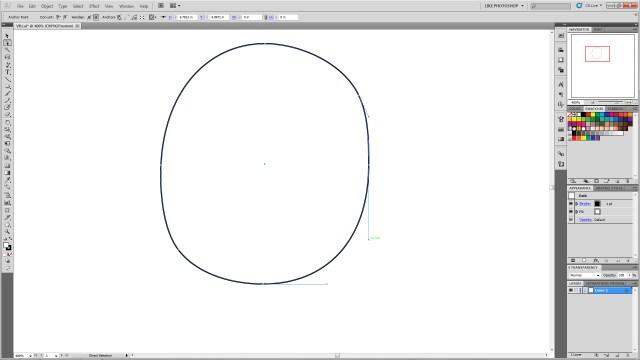
VB2

Step 3:

Create an oblong ellipse for the left eye.  Select it, ctrl+c to copy, ctrl+b to paste it behind the original eye.  (DO NOT click off of an object you’ve copied behind another object.  It will be extra steps and finagling to get it selectable again.  Any time you ctrl+c, ctrl+b in this tutorial DO NOT click anywhere else on the artboard, as it will deselect the new object and you’ll have to navigate to find it again.)   Then using the arrow keys nudge it to create the right eye.  While the right eye is selected shift+alt and resize and make it slightly smaller than the left (for perspective)

VB3

Step 4:

Select the star tool from the polygons.  Change it from 5 points to 3.  Click on the art board to create a triangle.

VB4

Step 5:

Rotate the triangle so the top point faces left.

VB5

Step 6:

Using the direct selection tool again, move the various specific anchor points to create the desired shape of the nose.
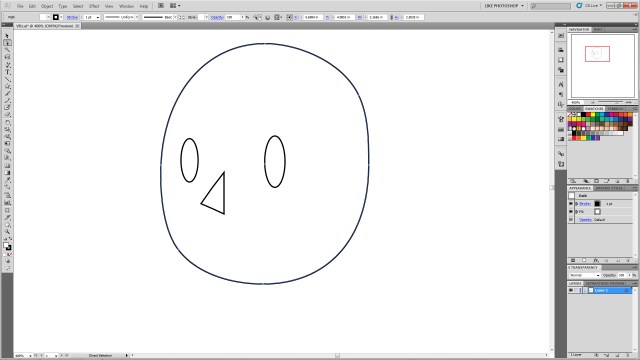
VB6

Step 7:

Using direct selection tool, select the central anchor point on the back of the nose.  Once it’s specifically selected hit delete to remove the line segment.

VB7

Step 8:

Using the ellipse tool create a wide oblong ellipse.  ctrl+c to copy it, ctrl+f to paste it forward and nudge it up.  This will be to create the smile, so feel free to move it to the desired position to make a bigger or different mouth.  You can also change the shape of the circle to make a bigger smile, a frown, or using different shapes and warps to make various expressions.
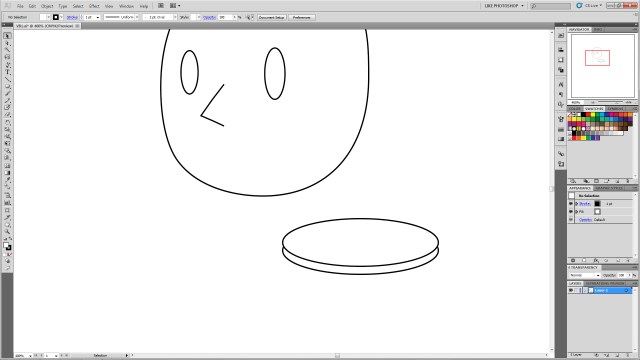
VB8

Step 9:

Select both circles.  Using the shape builder tool in CS5, hold alt and click and hold the top circle as shown.  Drag the curser through the top of the circles and release.  This will remove the unwanted shapes.
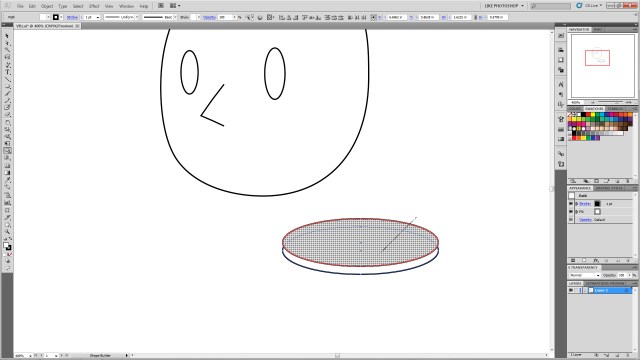
VB9

Step 10:

You’ll be left with just the desired “smile” shape.
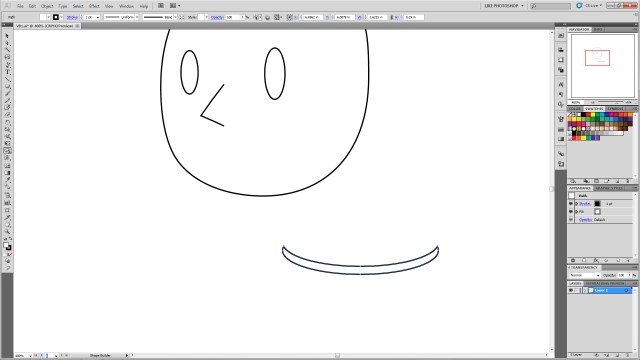
VB10

Step 11:

Position the new “smile” in the desired place on the head.

VB11

Step 12:

With the smile selected, ctrl+c to copy, ctrl+f to paste it in front of the smile.  Then, with the new shape selected, go to the menu, click Object–>Transform–>Rotate and type 90 into the box.  Then resize the item using shift+alt again to get it the appropriate size and move it to the corner of the mouth as shown.
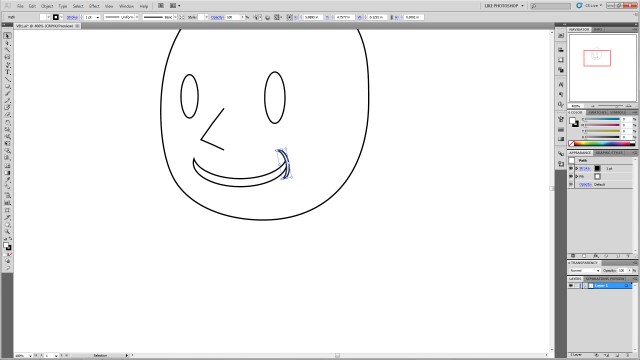
VB12

Step 13:

Select the new mouth corner, ctrl+c to copy, ctrl+b to paste it behind.  Nudge it to the other side of the mouth.  Go to Object–>Transform–>Reflect and select vertical.  The select the main mouth shape again.  ctrl+c to copy, ctrl+b to paste behind.  Nudge it below the original mouth.  shift+alt resize it to make it smaller to create the line under the smile as shown.

VB13

Step 14:

Click the main smile shape again.  Ctrl+c and ctrl+f and move it above the eye.

VB14

Step 15:

From the menu select Object–>Transform–>Reflect and select horizontal to flip it.  Then shift+alt resize to get it the desired shape.  You can also select the object and free transform rotate it to get it the desired angle (you can make angry eyes, arched eye brows, etc.)

VB15

Step 16:

Select your new eyebrow.  Ctrl+c, ctrl+b and nudge it with the arrow keys over the right eye.  Go to Object–>Transform–>Reflect and select vertical to flip it and get it the correct angle.  Shift+alt resize it to make it a bit smaller for perspective.

VB16

Step 17:

Click the left eye (his left!)  Ctrl+c, ctrl+b, to paste the copy behind the original.  Nudge the new one up so it’s visible peeking out over the original eye and repeat the process for the other eye.

VB17

Step 18:

Using the ellipse tool, shift+alt to create a perfect circle on the side of the head.
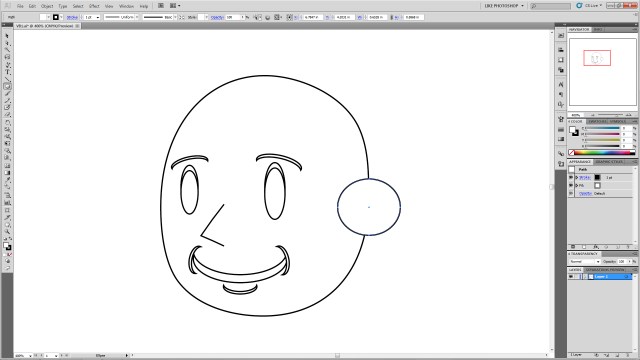
VB18

Step 19:

Select the head shape and the new circle.  Using the shape builder tool, click inside the head shape, hold, and drag to the new circle to join the shapes as shown.

VB19

VB20

Step 20:

Using the ellipse tool create a series of circles on top of the head.  This will be for the hair so feel free to make an arrangement you like.  Just remember we’ll be joining these using shape builder, so it may take a few tries at this to ensure you get the desired final shape.
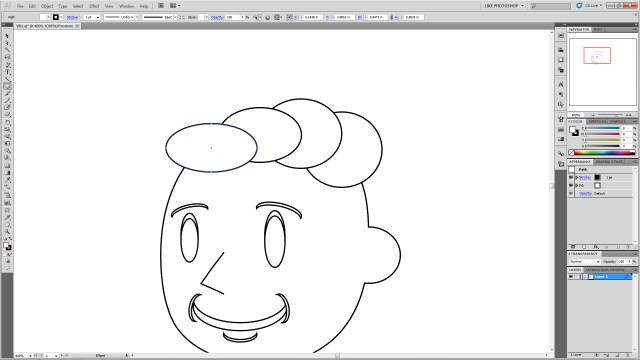
VB21

Step 21:

If you want the little swooshes as show, create two overlapping circles as shown, and select only those two.

VB22

Step 22:

Using shape builder, select the top circle, click hold+alt to delete the unwanted shape elements.

VB23

VB24

Step 23:

Drag the new crescent to the other circles, select ONLY the ellipses you created for the HAIR (Don’t select ANY of the other elements, especially the head shape.  This will mess up your art…) And join them using click+hold+drag over all the selected shapes.  You may have to do that several times inside the new “hair” shapes to join any extra shapes that might have been missed with the original join actions.

VB25

Step 24:

To add any extra “Swooshes” repeat process Step 21 as many times as you like and shape-builder them into the hair shape.  You can resize them and overlap them to make different shapes.  You can also resize the entire hair section.

VB26

VB27

VB28

VB29

VB30

Step 25:

Create a square using the rectangle tool in the location shown.

VB31

Step 26:

Using direct selection (again you may have to click each anchor point twice to make sure only the anchor is selected not the entire polygon) drag the points to the locations shown.
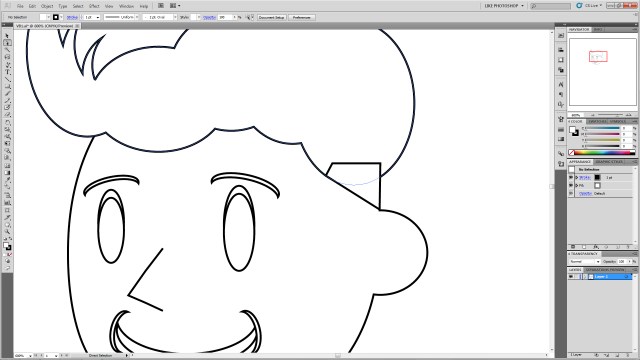
VB32

Step 27:

Select the “hair” shape and the newly-shaped polygon and join them using shape builder.  Feel free to resize or shape to create the look you’d like.

VB33

Step 28:

Create an ellipse in the location as shown and ctrl+left bracket ( [ ) key to send it to the back.

VB34

Step 29:

Selecting the new ellipse, Ctrl+c, ctrl+b to paste it and nudge it to the other side of the head.  You may wish to reposition it to give it the right angle.

VB35

Step 30:

Create a rounded rectangle and free-transform resize it as shown.

VB36

Step 31:

Free transform rotate it so the angle matches the angle of the square you create for the hair.

VB37

Step 32:

Ctrl+c, ctrl+f to copy and paste it as many times as desired.  Shift+alt resize them to get them the correct size and move them into position as shown.  It may help to move them down and left or right with the arrow keys to keep them in line rather than moving them with the mouse.
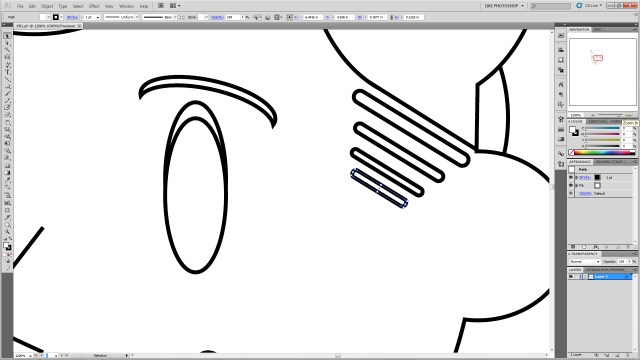
VB38

Step 33:

Color your shapes as desired.  Select each shape and select a color from the swatches to give them the desired color!

VBColors

Step 34:

Create two overlapping white ellipses in the left (his left!) eye.

VB39

Step 35:

Selecting your new ellipses, ctrl+c, ctrl+b them then nudge them to the right (his right!) eye. Shift+alt resize them for perspective again.

VB40

There it is, you’ve created a legally-distinct Vault Boy-type character head!

As a bonus!

Want to give him a gruffer look?

Step1:

Overlap the face with another ellipse.
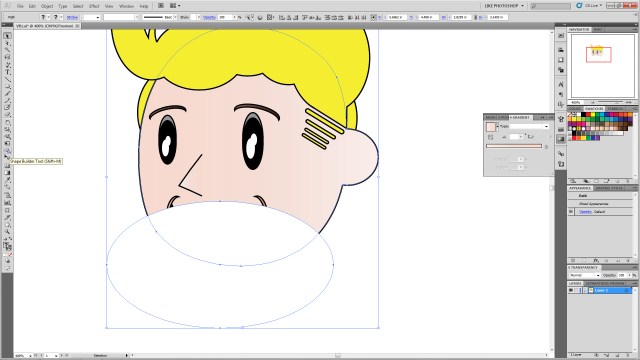
VBExtra1

Step 2:

Select the head shape and new ellipse shape and use the shape builder tool and click+alt to erase the outside ellipse shape.

VBExtra2

VBExtra3

Step 3:

Recolor the ellipse any shade of gray, brown, etc.
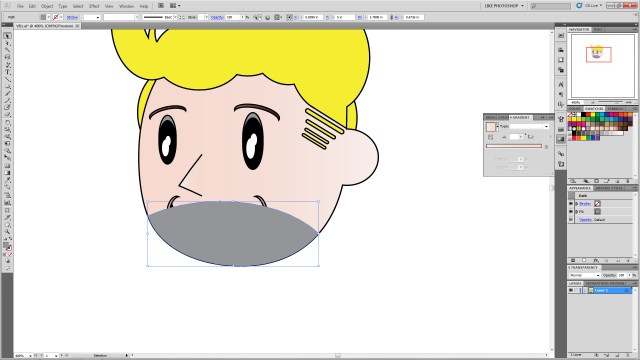
VBExtra4

Step 4:

Change the opacity to the desired shade to give him a 5 o’clock shadow look!
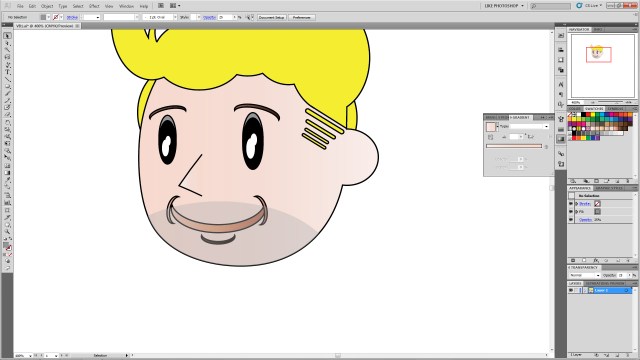
VBExtra5

Nashville’s Top Worst Drivers

I am an expert on Nashville drivers. For the last nine years, I have driven on average 40 miles a day, most times more. Last year, I sat in traffic for almost six hours due to inclement weather to travel 20 miles. A few years ago, it took me four hours to get to work due to a wreck. I know Nashville’s traffic and driving habits.

What inspired me to do this list are years of observation and experience. There are common stereotypes that women and the elderly can’t drive, and those with sports cars drive reckless. I disagree. I find the stereotypes of poor drivers lie within the driver, and specifically with the car they drive. So, here’s my list of Nashville’s top worst drivers, and although there are always exceptions, I challenge you to pay attention to the following makes and models:

Black-1995-Honda-Accord-LX-Front-Left-View
1995 Honda Accord
Photo: zuoda.com

Honda Accord – Like to go fast even though they have little power. They will cut you off and pass you just to be first.

Jeeps – Get out of the way.

Saturn cars – Oblivious drivers who think they are the only ones on the road.

Ford Mustang – The only sporty car on the list. Coincidence? No, these drivers have an ego so huge it barely fits in their car. They speed, cut you off, and think they are awesome.

2000 For Mustang Red
2000 Ford Mustang
Photo: americanmuscle.com

Tahoe, Suburban – Over compensation. These big vehicles take up lots of space, and the drivers don’t look when merging.

Ford F150, F250, big trucks – See above. I have one who likes to regularly honk at me because I won’t pull into oncoming traffic. We have exchanged hand signals several times.

Civics – The ones that are cheaply modified. These drivers want a reliable car that is cheap to mod, and they drive like they have a sports car. I cannot count how many Civic drivers have tried to race me.

Mini Van/Vans – Guaranteed to go at least 5 mph. under the speed limit. Notorious for getting into fast lanes and slowing everyone down. Be careful to pass though because they swerve, too.

Group of 2005 minivans in desert
2005 Minivans
Photo: autobytel.com

RVs – Too big to handle. People should have to take special classes to drive these. I was rear ended in a parking lot by one and almost killed on the interstate by another that was merging. Be very careful around these.

Pontiac GrandPrix – Speed and are impatient. Friday morning I had one pass me on my street to save him two seconds.

Dodge Strattus – Huge egos and reckless. They love to bully other drivers and start races.

Waste Management/Dump trucks – Will try to run you over and spray rocks. And they don’t care. Good luck reporting them because I have never seen a dump truck with a license plate.

Out-of-state drivers – There’s an unwritten rule in Nashville: Drive 5 mph. over the speed limit everywhere except for school zones. Out of towners are very slow and often drive in fast lanes under the speed limit. If you visit Nashville, be prepared to keep up!

Those are my picks! Do you have any model specific bad drivers in your area? Feel free to share in the comments below!

Off the Top of My Head #7: The Thanksgiving Bird is the Word

Off The Top of My Head

Last Thursday was Thanksgiving.  That usually means family, food, and time off work.  And typically when people say “the bird is great!” they’re referring to a roasted turkey they’re eagerly devouring along with various vegetables, pies, rolls, and sauces.  It’s as often as not a bald-faced lie too as, it turns out, turkey is apparently rather difficult to cook to perfection.  My dad usually has a good-turkey trick, but I’ve heard not everyone has as fool-proof a poultry plan.

This year, however, when I think of the “bird” from my 2012 Thanksgiving, I’ll think of THIS:

Hawk

After our Thanksgiving food-fest, I went to a store for a major caffeine hit, and when I returned this guy was waiting at the house.  He swooped down in most magnificent fashion, then performed daring, aggressive leaps at a small bush at the terrified little birds hiding within (he didn’t get any of those).

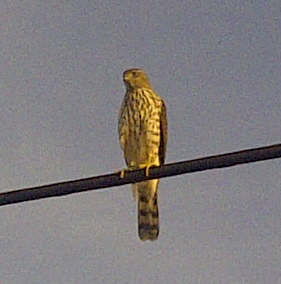
He then flew to a nearby powerline (where he imposingly glared down at me) …

Hawk
I took this pic and the above pic with my phone…which is why it’s as grainy as it is. Don’t believe the hype…phones aren’t cameras…

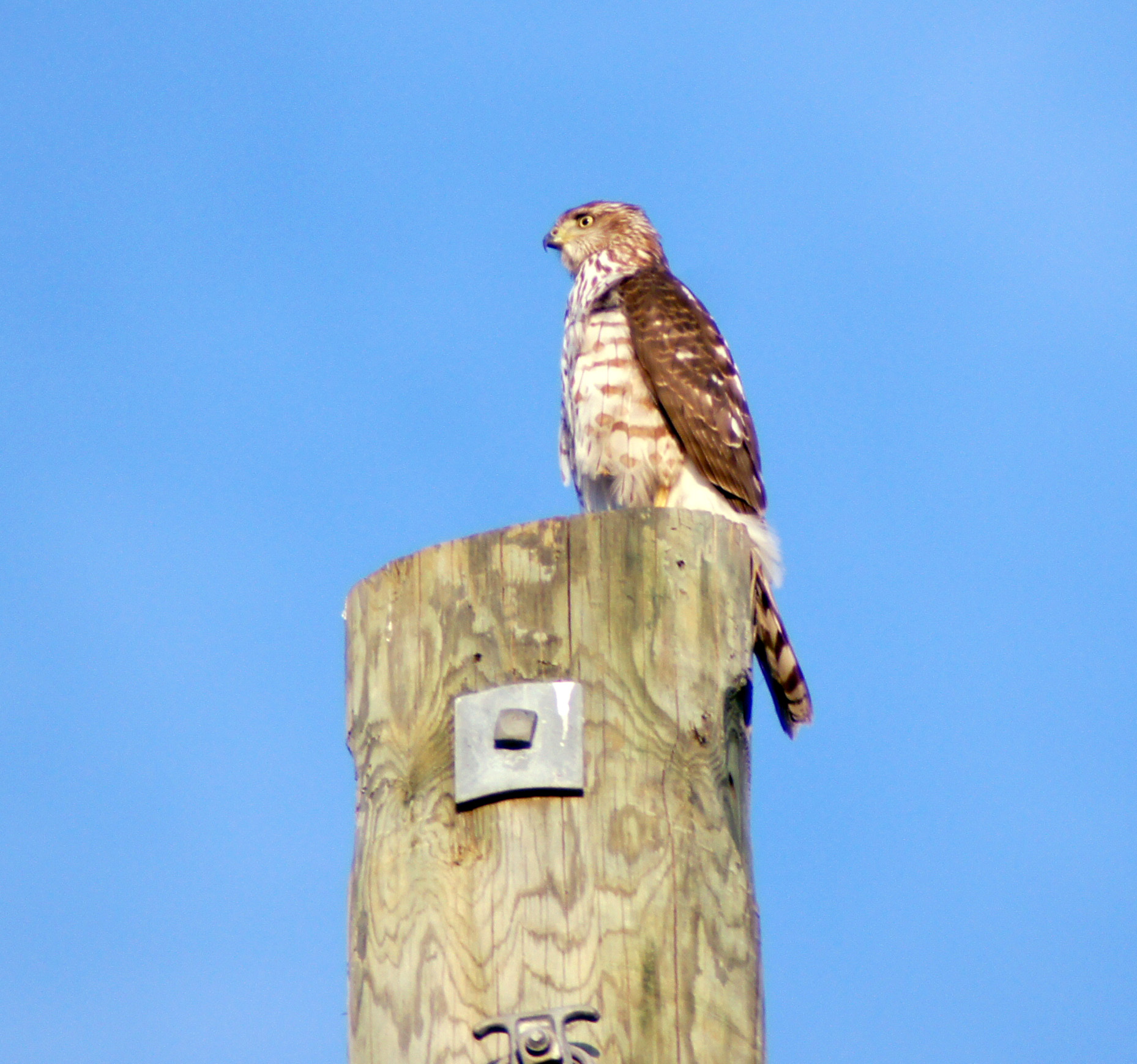
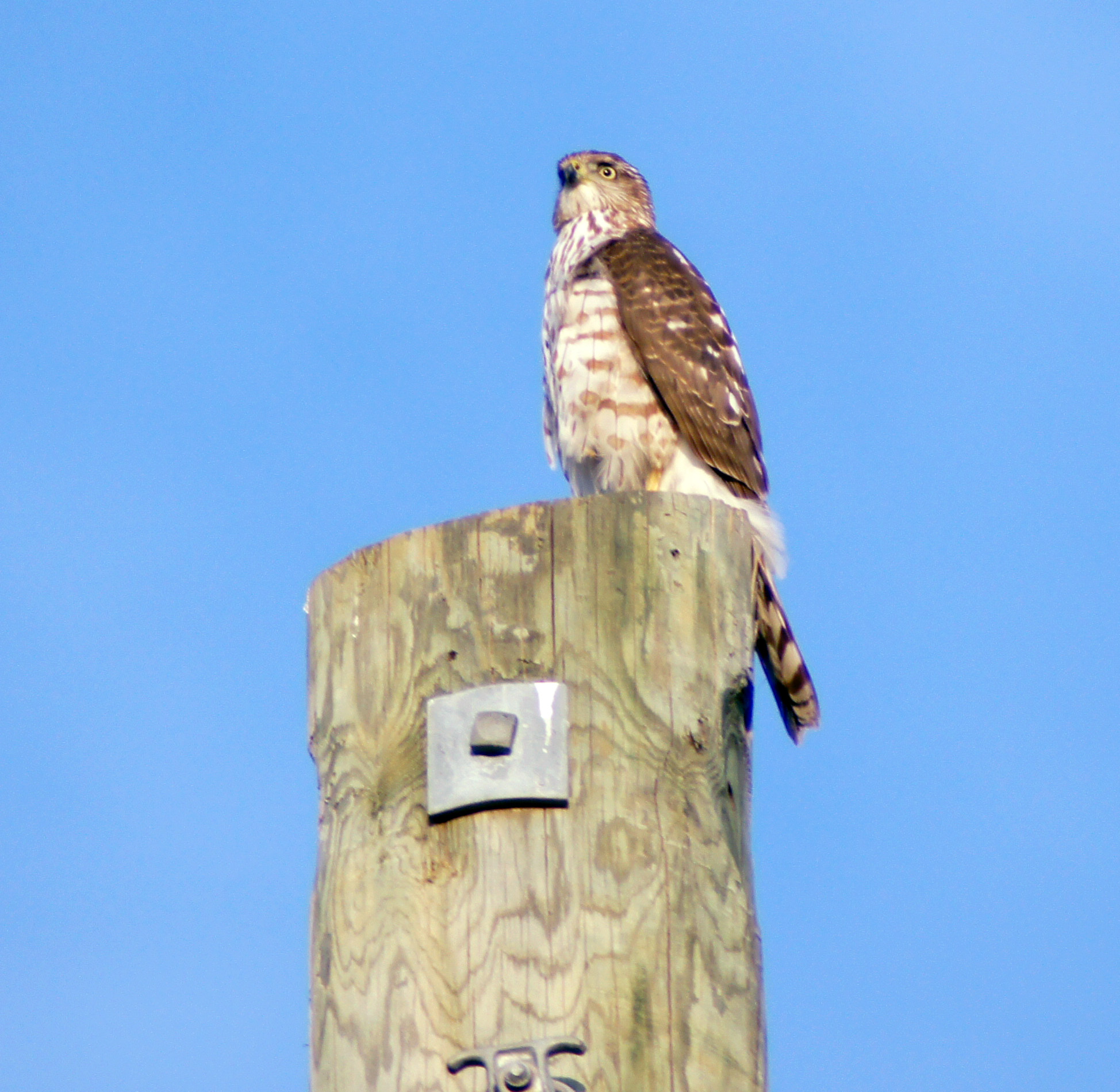
…and then to a pole where he regally surveyed the surrounding terrain for more accessible prey.  He stayed there long enough for me to run inside, grab my a55, and run back outside telephoto lens attached.  I was in such a rush I didn’t have time for the tripod set up.  Fortunately he lingered long enough for hi-drive speed to net me some good pictures!

Hawk HD

Hawk

I was able to get over 150 photos of him perched up there before he locked eyes on something a hundred or so yards away and again dove impressively out of site to either another near miss or on top of a less-fortunate small animal than the birds hiding in the lucky shrub.

I learned a few things from this:

1.) There’s something unique about seeing a natural predator like this in the suburbs.

2.) Birds of prey are fearless and seem naturally pretentious, the whole time he looked at me it was as if he was thinking, “Look at that clumsy mammal down there staggering around me for no reason…”

3.) No matter how old you are if you see such a thing in action the only thing you say is, “Wooooow…”

I think he was a juvenile Cooper’s Hawk, but can’t say for sure.

Seeing him definitely changed my definition of the Thanksgiving “bird” for a while!

To see more on strange avian holiday visitors see Story of the Month for November written by my lovely RevPub counterpart!

Next week will be a requested Illustrator tutorial, and the following week a return to Life-Lessons from Video Games!

Off the Top of My Head #6: Gangnam Style

Off The Top of My Head

I’m the last person in the world who gets into latest trends.  I’ve essentially been the same since about 1996 in terms of style, musical tastes, and interests.  That being said some fads are catchy.
I came late to the “Gangnam Style” craze.  It kept showing up in parodies, videos, and feeds on all my frequently visited sites and I was curious.  Needless to say it was pretty confusing and all the typical questions popped into my head such as, “What the-?” “Huh?” and “Why-?”  But when I saw the real video it all became clear.  It’s a hilarious track, the video is full of pop-satire, and, of course, it’s extremely catchy.

So when I went to the wedding of some friends and Gangnam Style came on it was hard not to do the dance, even if it was just on the sidelines.  The groom cut loose on the dance floor, and when my date to the wedding, the fairer half of RevPub, shoved me out on the dance floor I had two choices:

1.) I could slink back into the shadows and appear as a “punk” in the eyes of all in attendance.

or

2.) I could do my best to NOT be out-danced in public!

I went with the latter.  And the impromptu routine the groom and I concocted on the spot got lots of praise from everyone present!

Here’s a video taken at the event:

More than anything it was a LOT of fun, and goes to show, trends may seem a little silly, but if you can’t beat ’em…join ’em.  You might just have good time.