Life Lessons from Video Games Versus Mode: Street Fighter 2

LifeLessonsHeader

Street Fighter II…  Capcom’s sequel to the now-obscure Street Fighter changed the face of fighting games.  Multiple, selectable characters, specific special moves, bright graphics; it took everything that could be learned from beat em ups like Double Dragon and simplified it into a one-on-one tournament fighting game.

I won’t go into the game’s colorful history.  That’s not the focus of this review, this will just be my history of Street Fighter.

My first introduction to this legend of the arcade occurred in 6th grade.  Our middle school typically took students with decent grades and no suspensions on an “incentive” trip to a skating rink or a bowling alley.  That six weeks we all went to an local bowling alley for a couple of hours.  I wasn’t interested in bowling really, but the alley had two arcade machines.  I don’t remember what the other one was, but one was Street Fighter II.  There was a queue of kids lined up at one stick, and a kid named Ralph dominating the other.  I got into the queue, not knowing what this game was or why there was a line and one-by-one kids fell as Ralph took them out.  When it was my turn I put in my two quarters, selected the character I thought looked the most interesting (I chose Blanka…all I thought was “wow big green monster!”) and preceded to lose two rounds.  I didn’t do too badly.  In fact after the fight I remember saying, “I didn’t know what I was doing!” with a laugh and Ralph telling me, “Actually you didn’t do so badly…”

I only went to the arcade on rare instances or when the school went to a place that had some machines so I had to wait for a home version in order to really play games.  Despite having only played the game one time, I got swept up into the craze when Street Fighter II: Champion Edition came out on the Sega Genesis.

It was here that I really learned the game.  The Genesis standard controller wasn’t great for these games, but buying a six button controller made it PERFECT for Street Fighter (in fact the licensed “Street Fighter” controllers that came out with the release of SFIV look suspiciously like Sega 6-Button controllers…) and I played the game religiously.  So much so that on trips to the Rivergate Skate Center during 7th and 8th Grade incentive trips I started to run the Street Fighter II machine.  I originally played as Sagat, having recently seen Jean Claude van Damme’s Kickboxer but eventually moved to Ken, and solidified using Ken once super moves were introduced in Super Street Fighter II.

So what makes Street Fighter II a legend?

1.)    Design: Starting with the first thing a gamer would see when they first laid eyes on the cabinet or picked up the cartridge box.  The characters were all unique (except of course the Ryu-Ken similarities) and colorful.  Similarly the backgrounds were all character-specific and had great animations.

2.)    Graphics: Tied to design, the graphics of the game were amazing at the time.  The characters moved fluidly and smoothly, their jumps and attacks all looked better than anything I’d seen before, and the special moves truly looked special

3.)    Diversity: All the 14 of the 16 characters in Street Fighter II Champion Edition were unique.  Though similar commands were used for special moves, they didn’t execute the exact same moves (though they may be similar) and ALL the basic attacks were individual to each character.  Also each character (except essentially the four “boss” characters) had unique story-based endings that gave the game massive replayability.  Beating the game with Ryu was an entirely different prospect to beating it with Vega.  Similarly, fighting each enemy took thought.  You couldn’t always use the same strategy to beat Zangief as you did to beat Chun Li.  Until you mastered it…your brain had to be awake for this game.

4.)    Ease of Play: the most important aspect of a fighting game to me…and something I feel they’ve lost, even the Street Fighter series, over the years.  Fighting games are GREAT because they are “pick-up-and-play” games.  Like I said, I never played before losing terrifically to Ralph in that first game.  But I did ok.  It’s not button mashing, you don’t get far in Street Fighter doing that, but the attacks, moves, and special moves are all so easy to figure out and execute a player can easily learn how to play one or two characters after playing the game only a handful of times.  This pre-dates the over-complexity that I feel has been added into fighting games.  Long-strings of combos, idiotic “air-juggles,” and multiple counter moves are just more than I want in a fighting game.  Keep it simple and fun for me…

5.)    CONTROL: Tied to the last one but by far the most important aspect of the game.  Street Fighter II‘s control was a revolution to me.  It was intuitive to the player and even made sense for the actions being executed.  Pressing “back” to block was a stroke of genius.  Six attacks varying in strength, 3 punches and 3 kicks, all useful (thought admittedly I played for YEARS with just a jab-fierce and short-roundhouse button setup on PS1) “Down-Down+Forward-Forward” is actually the motion you’d expect a character to do when throwing a fireball.  The same goes for the Shoryuken and the Hundred-Hand Slap.   I don’t think I’ve ever played a game with more perfect control (but woe be unto the second player who’s used to playing first player…and has to reverse all those commands!)

Street Fighter II revolutionized arcade gaming.  Through various iterations of II, eventually Alpha (Alpha 3 is my favorite of the series by far…the most balanced and best character roster I feel), a 3D game (EX…ugh), and now back to 2D with Street Fighter IV (and its iterations), it retained basically the same controls.  It’s heaped on many new complex concepts, and crazy characters, but at it’s based on the same framework.

Next time will be another arcade fighting game that revolutionized the genre, Mortal Kombat!
Off the Edge #2: Annoying Holiday Car Commercials

Off the Edge

Next week I’ll start the first of my legitimate Versus Mode! posts but since it’s just after Christmas I really wanted to get this one out while it was still relevant!

I’m sure we’ve all seen it, I’ll set the stage:

You’re watching TV and this soft music comes up.  Some square-jawed guy walks through his overpriced house, by a Macy’s store-sized Christmas tree, and into a bedroom where he wakes his sleeping wife, who doesn’t have “I’ve been asleep hair or face.”  He then leads her outside where, sitting in the perfectly snowy driveway, sits an Acura, Infinity, Lexus, or Mercedes with a ridiculous big bow on it.  They celebrate, etc and voice over says something about a gift you both can cherish for years to come.

OK.  I HATE these commercials…  Truly.  It’s pure commercialized fantasy and borders on absurdity.  It could be that I don’t brush elbows with people in a high enough tax bracket that secretly buy their spouses cars for Christmas, but I’ve never heard of this happening for anyone.  The logical person in me (who makes up 85% of my personality) has a few problems with this:

  1. Who in the hell buys someone a $40-60,000 Christmas present?
  2. How does one spouse spend that much money on the other without the other knowing about it?
  3. I’d like to have been present for the conversations they have as they tried to figure out what the giftee spouse would like in a car…or did they care?
  4. Where does one get car-sized bows and ribbons, how much do they cost, what do you do with it AFTER the car has been given as a gift?

I know, they’re just trying to sell cars, but the entire concept is so annoying to me, even as commercials go, I thought I’d rant about this one while the season was right!

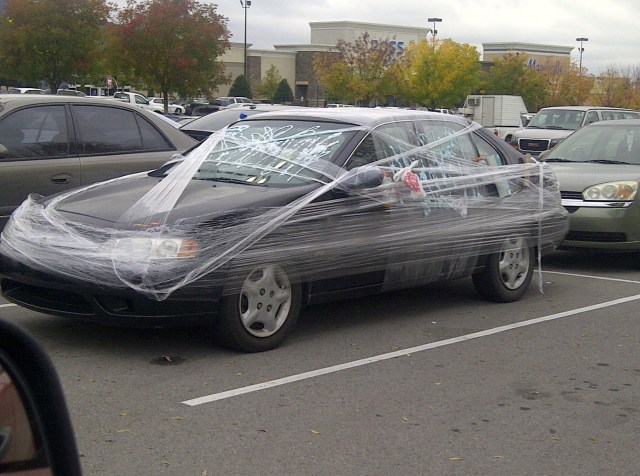
Photographs below show the closest I’ve come to seeing a car wrapped up for someone.  A friend and I went to Target in October and saw it sitting out there.  I have no idea who the owner was but they have my pity…

It was definitely wrapped and decorated…but the owner was probably less than happy about it…

So here’s the fantasy:

Here’s the closest I’ve seen…

IMG-20121026-00441 IMG-20121026-00442 IMG-20121026-00443

Next post is my Versus Mode Street Fighter II Reminisces!

Off the Top of My Head #7: Parental Christmas Cleverness

Off The Top of My Head

Every family has holiday traditions that are unique.  My family used to go for Chinese food every Thanksgiving and play Trivial Pursuit (the adults anyway) on Christmas.

Though we weren’t a rich family, I always credit my parents for doing whatever they had to do to make holidays as perfect as possible.  My mom fought parents during the Cabbage Patch craze, called toy stores and had clerks acting as informants looking for me a Teenage Mutant Ninja Turtles “Leatherhead” figure, and even bought an 11 year old a set of swords from a xeroxed mail-order catalog.

She also liked to have fun with our presents.  She had a couple of sneaky-snooping kids who were home alone all day during Christmas and Summer Break (both my sister and I have summer birthdays) while she and my father worked.  She knew we’d snoop around for our presents…and so she set about hiding them in creative places.  She somehow managed to hide two bikes, a skateboard, and a scooter in the late 80s in our mid-sized condo.  I still don’t know how she did that…

To this day I can say, though my presents were always around the house…I only ever had access to one, the swords.  I was there when they were delivered, and I checked them out before she put them under her bed til my birthday.  My favorite hidden present is from Christmas…circa 1992.

I was a Sega player.  Since my mom got me that Sega Game Gear and I traded my NES for a Genesis, I loved Sega products, games, and franchises.  That year I asked for a Sega CD.  My mom played it cool with me and didn’t let on that I would get it.  I remember searching everywhere for that thing.  We set up our tree (we were using a little 4′ one at this point), laid out the crocheted tree skirt (which was made the the GIANT 6′ tree we used to have! and is still awesome…), put presents underneath, but nothing that looked like a Sega CD to me.  I dug through the house, looked in closets, under beds…nowhere to be found.

Christmas morning I awoke to find extra presents in the pile under the tree, we went through them and…still no Sega CD.  Eventually my mom, registering my disappointment, said “there’s one more.  Look under the tree.”  I did, confused, there was clearly nothing left…  She said, “No UNDER the tree!”  I lifted the heavy crocheted green tree-skirt and there, with the little Christmas tree standing directly on the massive dense box, was my Sega CD.

Sega CD
Mine actually came with “Sewer Shark,” which I played with my buddy Mike as navigator for months…

We still laugh about how my mom was so sneaky she once hid a HUGE present under the Christmas tree and I never knew about it until Christmas morning despite all my snooping…

So Merry Christmas to all the great, sneaky, fun parents out there.  The ones that give real presents like memories like that…long after present wrapped in colored paper has seen its last use.

Life Lessons from Video Games: Versus Mode!

LifeLessonsHeader

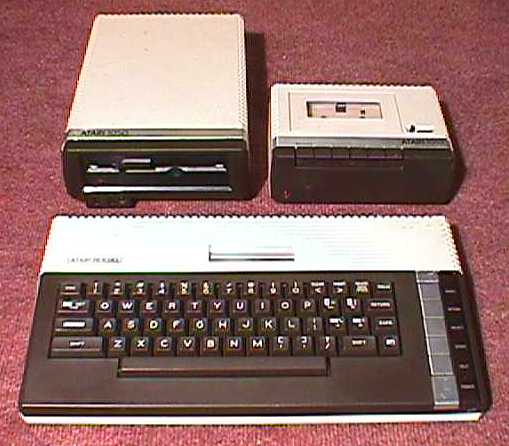
I’ve been playing video games since I 4 years old.  My first “gaming” system was an Atari 400 and was replaced (actually it was added to by) an Atari 800XL in the mid-80s.  I was a military kid who lived in secluded base-housing and, essentially, only knew my family.  I just assumed that everyone was playing Centipede, Missile Command, Frogger, and  Pac-Man.  In addition I had loads of games that almost no one has heard of but remain my all-time favorites; Sea Horse Hide n Seek, Ducks Ahoy, and Movie Musical Madness.  It wasn’t until my father retired from the USAF and we moved into “civilian” life that I first learned of what kinds of systems were popular.

I had an Atari…but never heard of an Atari 2600.  My memories of Pac-Man are slightly different from most others…the 400 and 800XL computers I had played different versions that actually (to me) looked superior to the 2600 version.  I only ever saw Commodore 64s and Apple IIs in school.  I never heard of Colecovision until I saw it on VH1’s I Love the 80s and never heard of Intellevision until James Rolfe did a video about it.  I DID hear of NES almost immediately after my we left the military lifestyle.

Atari400

Atari400

Atari800

I can remember being in my elementary school cafeteria in my private school blue shirt and slacks and a vicious little rich kid snarling at me, “What?  You don’t have Nintendo?! What’s ‘Atari’?”  I remember telling my mom that and she said, “I bet our Atari has better graphics than their ‘Nintendo…'”  And I immediately agreed.  And the game was on.

Over my lifetime I’ve seen numerous competitions in video games, systems, and gaming culture in general that are all just as frivolous and subjective as this one.  Sega vs. Nintendo.  Street Fighter vs. Mortal Kombat.  Sony vs. Microsoft.  It’s been fascinating to see them come and go, and each generation of hardware and software customers act like it’s the first time these things have ever been discussed.  I’ve been thinking a lot about all these various, senseless wars I’ve witnessed during my gaming life and thought I’d start sharing some of the most memorable.  Since this is just a little intro I thought I’d start with a brief look at the Atari vs NES.

Of course the Atari 400, which came out in 1979, and even the updated 800XL had nothing, hardware-wise, on the NES.  The NES came over from Japan with a library of games that would become classics (and some hardware strangeness that would fall into pop-culture obscurity).  Since the NES clearly has the edge in nearly every technical sense, I thought I’d look at just one thing that strikes me as amusing in terms of my old Ataris compared to the NES.

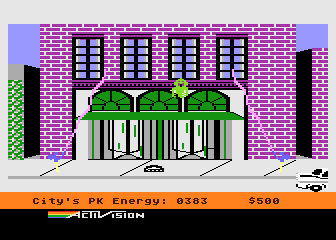
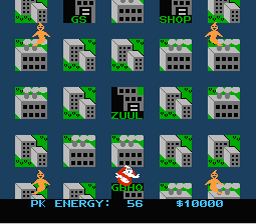
I started watching AVGN when the new Ghostbusters game was set to come out on current-gen consoles.  I heard a funny online reviewer had reviewed the NES Ghostbusters game and I was intrigued, I didn’t know there WAS one.  I turned on his review and was alarmed to see him reviewing a game I knew…only I knew it from my Atari 800XL…I knew it on floppy disk……and I knew a MUCH better version!  Smoother gameplay, more “ghostbuster-y” graphics, and less idiotic additions (like the gas station…)  Granted it was still a monotonous “wtf is going on?” kind of game, but the NES version looks like a butchered port…of an Atari game.  The Atari version was no masterpiece…but it’s definitely competitive with the later NES version!

That little fact did indeed help remind me that, although the most popular system might dominate the market, the reviews, and rewrite the history, for the minority of us who lived with other brands…we might have found a nice classic gem.

In two weeks I’ll start versus mode in earnest, and will try to do one every two weeks.  The first one will be the most appropriate way to start such a contest and has been a heated debate for almost 20 years…ladies and gentlemen…it will be: Street Fighter vs. Mortal Kombat!

Atari GB

NES GB

Off the Artboard #3 – Vault-Boy-Like Character Creation Part 1

OffTheArtBoard

This is a tutorial requested by my good friend and fellow Illustrator neophyte, Ron Peaks.  Looking to use a simple cartoon character for a manual similar to the cartoon Vault-Boy character from the Fallout series, yet still usable in a non-Bethesda-Obsidian publication.  It sounded like a good challenge so I took him up on it.

I have two warnings about this!  First, it’s a LOT longer than intended, because it has a lot of screenshots.  Second, this is just the way I figured out how to do it with my limited Illustrator knowledge.  I’m sure there are other, better ways, but if you want to learn how to make this kind of character with just basic tools this was the way that was most intuitive to me.  It uses just a few basic tools and is easy to color and personalize.

I’ve tried hard to not sound like Strong Bad trying to teach everyone to draw a dragon… (draw and “s”…then a more different “s”…)

This post will appear in two parts, this on shows how to make the character’s head.  One in a few weeks will show how to make his body.

An Illustrator Simpleton’s Guide to Making a Character that Resembles, Yet is Legally Distinct, from Fallout’s Vault-Boy:

 Step 1:

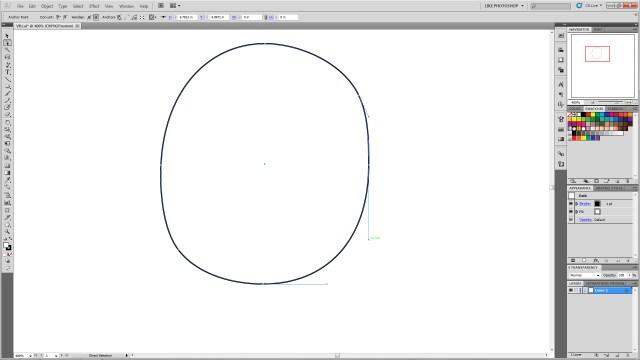
Create a perfect circle by selecting the ellipse tool, holding alt+shift and left click dragging it onto the page.

VB1

Step 2:

Add two anchor points using the add anchor point tool (it is in the same family as the pen tool left click and hold the pen tool and select it from the list that appears)  in between the left bottom and right top existing anchor points on the circle.  Click the “direct selection” tool, click each of the new anchor points you’ve just created (you may have to click them then click them again to ensure you’ve selected them).  Click and hold and drag them to a new location to warp the circle and make it appear a bit more square.

VB2

Step 3:

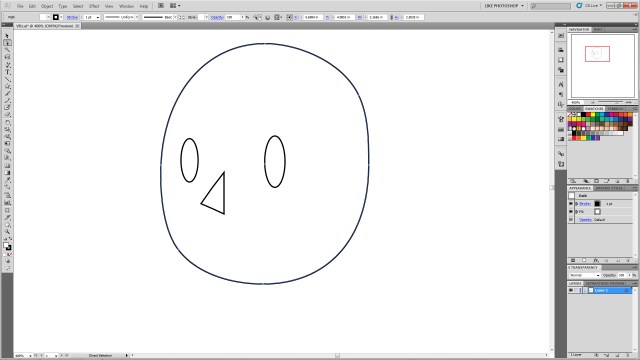
Create an oblong ellipse for the left eye.  Select it, ctrl+c to copy, ctrl+b to paste it behind the original eye.  (DO NOT click off of an object you’ve copied behind another object.  It will be extra steps and finagling to get it selectable again.  Any time you ctrl+c, ctrl+b in this tutorial DO NOT click anywhere else on the artboard, as it will deselect the new object and you’ll have to navigate to find it again.)   Then using the arrow keys nudge it to create the right eye.  While the right eye is selected shift+alt and resize and make it slightly smaller than the left (for perspective)

VB3

Step 4:

Select the star tool from the polygons.  Change it from 5 points to 3.  Click on the art board to create a triangle.

VB4

Step 5:

Rotate the triangle so the top point faces left.

VB5

Step 6:

Using the direct selection tool again, move the various specific anchor points to create the desired shape of the nose.

VB6

Step 7:

Using direct selection tool, select the central anchor point on the back of the nose.  Once it’s specifically selected hit delete to remove the line segment.

VB7

Step 8:

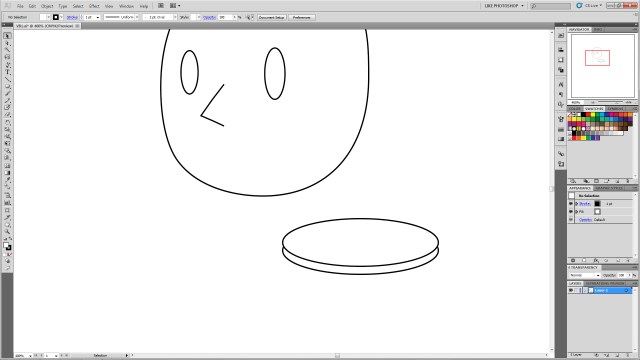
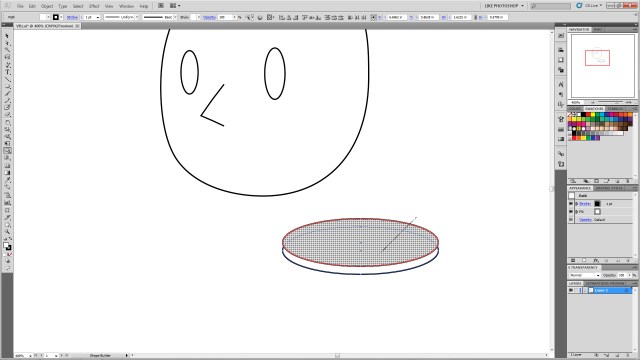
Using the ellipse tool create a wide oblong ellipse.  ctrl+c to copy it, ctrl+f to paste it forward and nudge it up.  This will be to create the smile, so feel free to move it to the desired position to make a bigger or different mouth.  You can also change the shape of the circle to make a bigger smile, a frown, or using different shapes and warps to make various expressions.

VB8

Step 9:

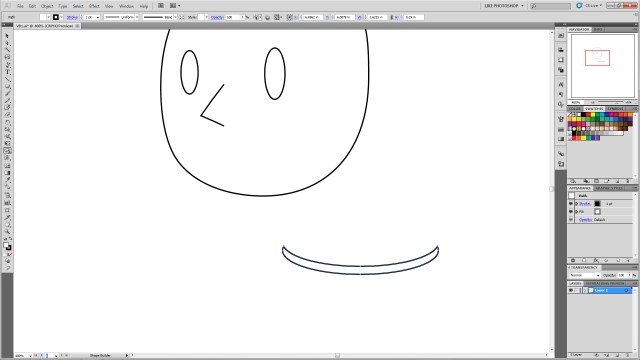
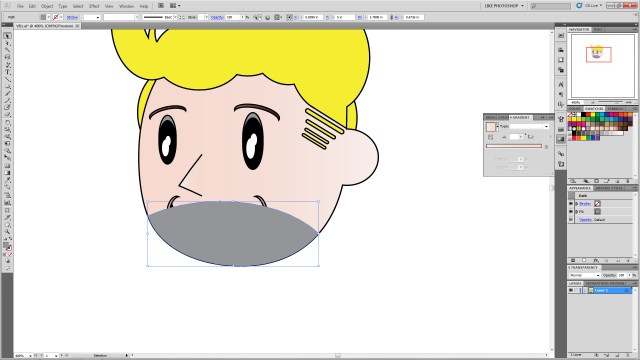
Select both circles.  Using the shape builder tool in CS5, hold alt and click and hold the top circle as shown.  Drag the curser through the top of the circles and release.  This will remove the unwanted shapes.

VB9

Step 10:

You’ll be left with just the desired “smile” shape.

VB10

Step 11:

Position the new “smile” in the desired place on the head.

VB11

Step 12:

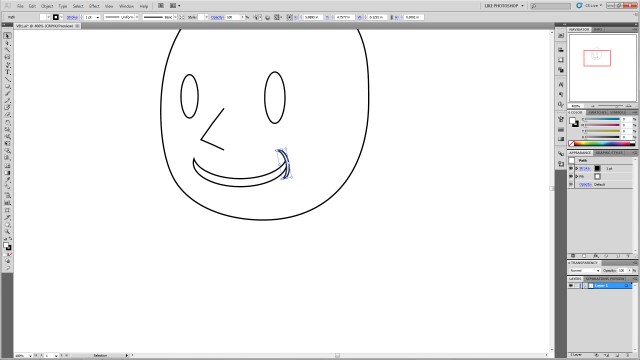
With the smile selected, ctrl+c to copy, ctrl+f to paste it in front of the smile.  Then, with the new shape selected, go to the menu, click Object–>Transform–>Rotate and type 90 into the box.  Then resize the item using shift+alt again to get it the appropriate size and move it to the corner of the mouth as shown.

VB12

Step 13:

Select the new mouth corner, ctrl+c to copy, ctrl+b to paste it behind.  Nudge it to the other side of the mouth.  Go to Object–>Transform–>Reflect and select vertical.  The select the main mouth shape again.  ctrl+c to copy, ctrl+b to paste behind.  Nudge it below the original mouth.  shift+alt resize it to make it smaller to create the line under the smile as shown.

VB13

Step 14:

Click the main smile shape again.  Ctrl+c and ctrl+f and move it above the eye.

VB14

Step 15:

From the menu select Object–>Transform–>Reflect and select horizontal to flip it.  Then shift+alt resize to get it the desired shape.  You can also select the object and free transform rotate it to get it the desired angle (you can make angry eyes, arched eye brows, etc.)

VB15

Step 16:

Select your new eyebrow.  Ctrl+c, ctrl+b and nudge it with the arrow keys over the right eye.  Go to Object–>Transform–>Reflect and select vertical to flip it and get it the correct angle.  Shift+alt resize it to make it a bit smaller for perspective.

VB16

Step 17:

Click the left eye (his left!)  Ctrl+c, ctrl+b, to paste the copy behind the original.  Nudge the new one up so it’s visible peeking out over the original eye and repeat the process for the other eye.

VB17

Step 18:

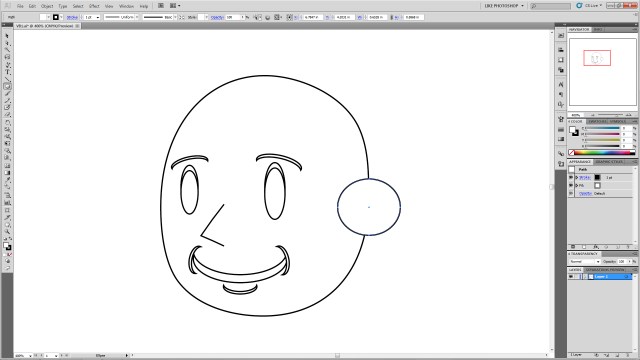
Using the ellipse tool, shift+alt to create a perfect circle on the side of the head.

VB18

Step 19:

Select the head shape and the new circle.  Using the shape builder tool, click inside the head shape, hold, and drag to the new circle to join the shapes as shown.

VB19

VB20

Step 20:

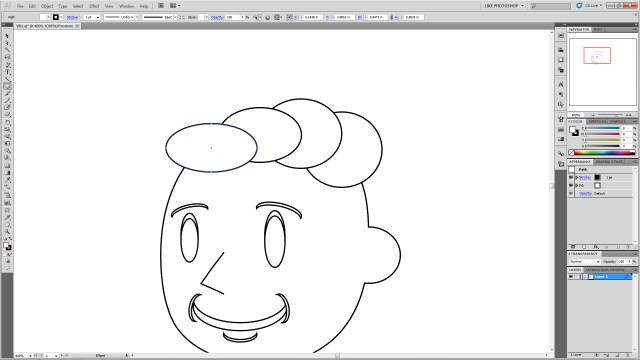
Using the ellipse tool create a series of circles on top of the head.  This will be for the hair so feel free to make an arrangement you like.  Just remember we’ll be joining these using shape builder, so it may take a few tries at this to ensure you get the desired final shape.

VB21

Step 21:

If you want the little swooshes as show, create two overlapping circles as shown, and select only those two.

VB22

Step 22:

Using shape builder, select the top circle, click hold+alt to delete the unwanted shape elements.

VB23

VB24

Step 23:

Drag the new crescent to the other circles, select ONLY the ellipses you created for the HAIR (Don’t select ANY of the other elements, especially the head shape.  This will mess up your art…) And join them using click+hold+drag over all the selected shapes.  You may have to do that several times inside the new “hair” shapes to join any extra shapes that might have been missed with the original join actions.

VB25

Step 24:

To add any extra “Swooshes” repeat process Step 21 as many times as you like and shape-builder them into the hair shape.  You can resize them and overlap them to make different shapes.  You can also resize the entire hair section.

VB26

VB27

VB28

VB29

VB30

Step 25:

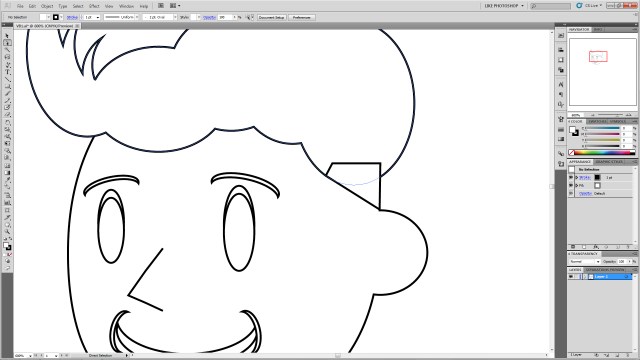
Create a square using the rectangle tool in the location shown.

VB31

Step 26:

Using direct selection (again you may have to click each anchor point twice to make sure only the anchor is selected not the entire polygon) drag the points to the locations shown.

VB32

Step 27:

Select the “hair” shape and the newly-shaped polygon and join them using shape builder.  Feel free to resize or shape to create the look you’d like.

VB33

Step 28:

Create an ellipse in the location as shown and ctrl+left bracket ( [ ) key to send it to the back.

VB34

Step 29:

Selecting the new ellipse, Ctrl+c, ctrl+b to paste it and nudge it to the other side of the head.  You may wish to reposition it to give it the right angle.

VB35

Step 30:

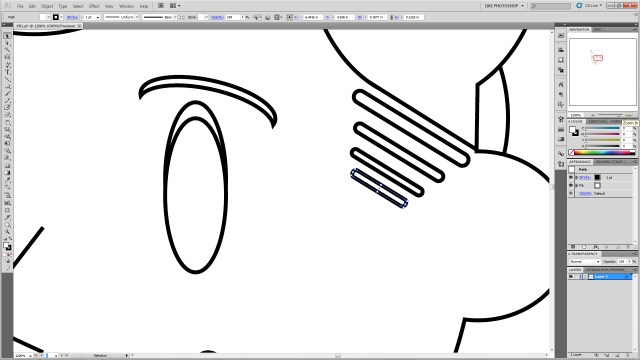
Create a rounded rectangle and free-transform resize it as shown.

VB36

Step 31:

Free transform rotate it so the angle matches the angle of the square you create for the hair.

VB37

Step 32:

Ctrl+c, ctrl+f to copy and paste it as many times as desired.  Shift+alt resize them to get them the correct size and move them into position as shown.  It may help to move them down and left or right with the arrow keys to keep them in line rather than moving them with the mouse.

VB38

Step 33:

Color your shapes as desired.  Select each shape and select a color from the swatches to give them the desired color!

VBColors

Step 34:

Create two overlapping white ellipses in the left (his left!) eye.

VB39

Step 35:

Selecting your new ellipses, ctrl+c, ctrl+b them then nudge them to the right (his right!) eye. Shift+alt resize them for perspective again.

VB40

There it is, you’ve created a legally-distinct Vault Boy-type character head!

As a bonus!

Want to give him a gruffer look?

Step1:

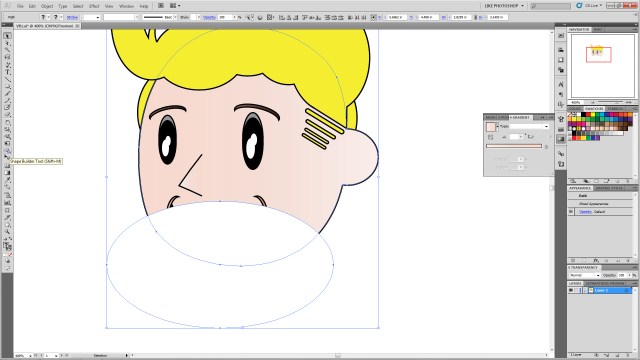
Overlap the face with another ellipse.

VBExtra1

Step 2:

Select the head shape and new ellipse shape and use the shape builder tool and click+alt to erase the outside ellipse shape.

VBExtra2

VBExtra3

Step 3:

Recolor the ellipse any shade of gray, brown, etc.

VBExtra4

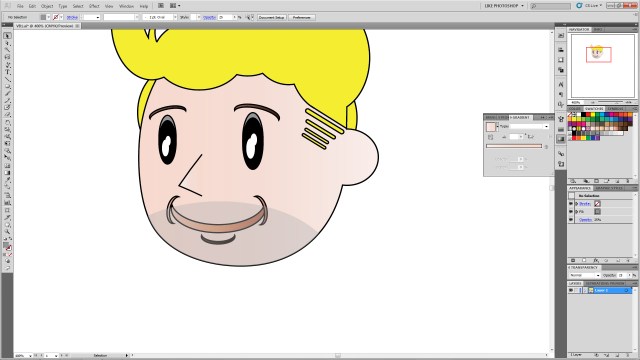
Step 4:

Change the opacity to the desired shade to give him a 5 o’clock shadow look!

VBExtra5

Off the Top of My Head #7: The Thanksgiving Bird is the Word

Off The Top of My Head

Last Thursday was Thanksgiving.  That usually means family, food, and time off work.  And typically when people say “the bird is great!” they’re referring to a roasted turkey they’re eagerly devouring along with various vegetables, pies, rolls, and sauces.  It’s as often as not a bald-faced lie too as, it turns out, turkey is apparently rather difficult to cook to perfection.  My dad usually has a good-turkey trick, but I’ve heard not everyone has as fool-proof a poultry plan.

This year, however, when I think of the “bird” from my 2012 Thanksgiving, I’ll think of THIS:

Hawk

After our Thanksgiving food-fest, I went to a store for a major caffeine hit, and when I returned this guy was waiting at the house.  He swooped down in most magnificent fashion, then performed daring, aggressive leaps at a small bush at the terrified little birds hiding within (he didn’t get any of those).

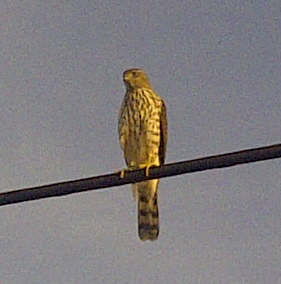
He then flew to a nearby powerline (where he imposingly glared down at me) …

Hawk
I took this pic and the above pic with my phone…which is why it’s as grainy as it is. Don’t believe the hype…phones aren’t cameras…

…and then to a pole where he regally surveyed the surrounding terrain for more accessible prey.  He stayed there long enough for me to run inside, grab my a55, and run back outside telephoto lens attached.  I was in such a rush I didn’t have time for the tripod set up.  Fortunately he lingered long enough for hi-drive speed to net me some good pictures!

Hawk HD

Hawk

I was able to get over 150 photos of him perched up there before he locked eyes on something a hundred or so yards away and again dove impressively out of site to either another near miss or on top of a less-fortunate small animal than the birds hiding in the lucky shrub.

I learned a few things from this:

1.) There’s something unique about seeing a natural predator like this in the suburbs.

2.) Birds of prey are fearless and seem naturally pretentious, the whole time he looked at me it was as if he was thinking, “Look at that clumsy mammal down there staggering around me for no reason…”

3.) No matter how old you are if you see such a thing in action the only thing you say is, “Wooooow…”

I think he was a juvenile Cooper’s Hawk, but can’t say for sure.

Seeing him definitely changed my definition of the Thanksgiving “bird” for a while!

To see more on strange avian holiday visitors see Story of the Month for November written by my lovely RevPub counterpart!

Next week will be a requested Illustrator tutorial, and the following week a return to Life-Lessons from Video Games!